A digital business card is not just a card.
It is your employee’s public face, your brand’s first impression, a lead capture tool, and often a QR-linked gateway to everything your company stands for. When something goes wrong with it, the damage is not limited to one contact. It ripples across your entire professional identity.
So before your team scales contact sharing, you need to ask the right question: how secure is this, really?
The answer is yes, digital business cards are secure. But only when your company manages them properly. The risk is not the format. The risk is the lack of control.
Here’s all you need to know about digital business card security, and how to roll digital cards securely for your organization.
Key Takeaways:
- Secure digital cards need central control and clear access rules.
- Unmanaged employee cards create brand, privacy, and data risks.
- Both NFC and QR codes are safe when they lead to trusted company profiles.
- Lead capture must be secure, limited, and responsibly managed.
- Regular reviews keep cards accurate, active, and compliant.
- The stakes are higher than most companies realize
- What “Secure” actually means for a digital business card
- Where things go wrong: Common security risks to watch for
- What to look for in a secure digital business card platform
- How to roll out digital business cards without creating new risks
- The bottom line
- Frequently asked questions
The stakes are higher than most companies realize
Here is some context worth sitting with.
IBM’s 2025 Cost of a Data Breach Report puts the global average breach cost at USD 4.4 million.
Meanwhile, APWG reported over one million phishing attacks in Q1 2025 alone, the highest quarterly figure since late 2023. A significant number of those attacks used QR codes as the entry point, leading unsuspecting recipients to phishing sites and malware.
Your employees are sharing QR codes every day. At conferences, over email, on LinkedIn, in proposals. If those codes are not tied to a verified, company-managed profile, you are handing criminals an easy on-ramp.
NFC cards carry a similar risk. A physical NFC card can be reprogrammed by someone with the right tool and brief access to it. If an employee loses their card or leaves it unattended, the destination it points to can be changed without any visible sign of tampering. Unlike a centrally managed digital profile, a compromised NFC card gives you no alert and no audit trail.
That is not a reason to avoid digital business cards. It is a reason to manage them properly.
Not all platforms are built to the same standard. When evaluating a digital business card solution for your team, look for platforms that carry SOC-2 certification, comply with GDPR, offer a formal Data Processing Agreement (DPA), and encrypt data both at rest and in transit.
These are not nice-to-haves. They are the baseline for any platform handling employee and prospect data at scale.
What “Secure” actually means for a digital business card
Digital business card security is not a single feature. It is a system. A truly secure digital business card protects four things simultaneously: employee identity, company brand, prospect data, and access control.
Here is what that looks like in practice.
Centralized card management
If your employees are creating cards on five different tools, you do not have a digital business card strategy. You have a scattered mess of unverified profiles with no oversight.
A secure setup means one dashboard. Admins create, update, approve, and deactivate cards from a single place. Marketing controls the brand. HR manages the employee lifecycle.
Leadership has visibility. Nobody is freelancing with your company’s identity.
Role-based access control
Not everyone should be able to change everything.
Your marketing team should control logos and messaging. HR should handle employee details. Sales managers should see their team’s lead activity. Individual employees should only edit the personal fields they are allowed to touch.
Role-based permissions keep the right people in control and reduce the risk of accidental or unauthorized changes.
Secure authentication
Access is where most breaches begin.
Verizon’s 2025 Data Breach Investigations Report found that credential abuse was the leading initial attack vector in data breaches at 22%, followed closely by vulnerability exploitation at 20%. That means weak or shared logins are a genuine threat, not a theoretical one.
Every account connected to your digital business card platform, admin, or employee, should be protected with strong authentication. This is not optional.
For larger teams, Single Sign-On (SSO) integration takes this a step further. SSO connects your digital business card platform directly to your existing identity provider, such as Okta, Azure AD, or Google Workspace.
Employees log in with their existing company credentials, eliminating the need for separate passwords and significantly reducing credential-related risk. It also means that when an employee is offboarded from your directory, their access is revoked automatically.
Employee lifecycle management
People join. They move teams. They leave.
Every one of those moments creates a window of risk if your system is not built to handle them. A former employee’s card should not keep circulating with your company logo and an active phone number.
The cleanest way to close that window is direct integration with your employee directory.
When your digital business card platform connects to directories like Microsoft Azure Entra ID or Google Workspace, employee data flows automatically.
A new hire added to your directory gets a card provisioned with their name, title, department, and email address, without anyone having to manually set it up. A role change in the directory updates the card.
An offboarded employee gets their card deactivated the moment their account is removed.
Data encryption
Your cards carry real information: employee names, work emails, phone numbers, leads form responses, and engagement data. That information should be encrypted both in storage and in transit.
Before you commit to any platform, ask one direct question: how do you protect company and user data? If the answer is vague or buried in legal language, that tells you something.
A platform worth trusting should use encryption for data at rest and in transit as a baseline practice. Look for explicit confirmation of this in their documentation or DPA.
A Data Processing Agreement is a formal, legally binding document that defines how your company’s data is collected, stored, processed, and protected. If a vendor cannot provide one, that is a serious red flag.
Privacy controls
Security also means protecting your employees, not just your company.
A good platform lets you decide what is public and what is not. Employees can display a work email instead of a personal number. They can link a company booking page instead of a private calendar. Personal details stay personal.
Your employees will share their cards more confidently when they know they are not overexposing themselves.
Branded and verified profiles
In 2025, Gartner reported that 69% of B2B buyers encounter inconsistencies between what a company’s website says and what its sellers tell them. That inconsistency erodes trust before a deal even starts.
Branded, company-approved cards solve this. Consistent logos, colors, titles, and links tell prospects and partners they are engaging with the right person from the right company. That signal matters, especially in sales, recruiting, finance, and enterprise services, where first impressions carry real weight.
Safe lead capture
If your card includes a contact form, you are collecting personal data. That comes with responsibility.
Lead capture should be limited to what is actually needed: name, email, phone, company, and a message field at most. Access to that data should be restricted to the right people. A contact form that feeds into an unsecured inbox is not a sales tool. It is a liability.
Where things go wrong: Common security risks to watch for
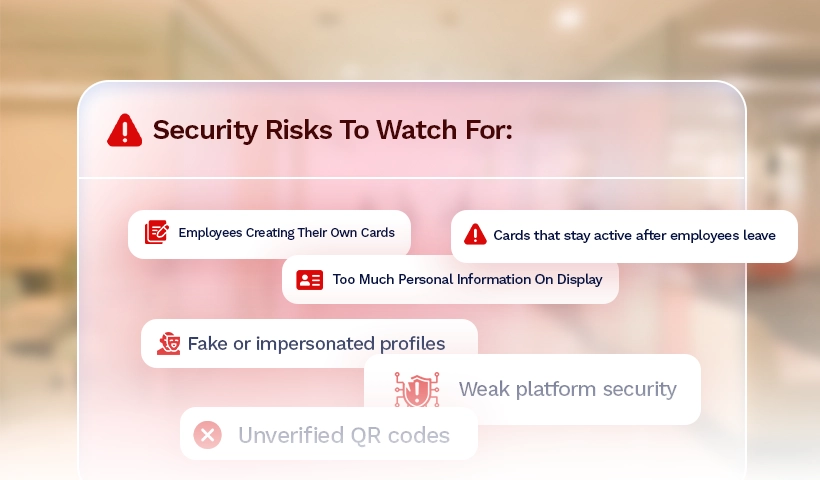
Most digital business card security problems are not sophisticated attacks. They are management failures. Here is where companies most often lose control.
Employees creating their own cards
When people use personal tools and free platforms, you lose visibility. Cards go out with wrong titles, outdated links, and inconsistent branding. You cannot deactivate what you did not create.
Too much personal information on display
Without clear guidelines, employees may include personal phone numbers, home locations, or private social profiles. A centrally managed system with defined field rules prevents this.
Weak platform security
Not every digital business card platform is built for business-grade use. If a platform does not offer role permissions, proper authentication, encrypted data handling, and clear offboarding controls, it is not ready for your team.
Fake or impersonated profiles
Without centralized management, anyone can create a card that appears to represent your company. Branded, admin-controlled profiles make this much harder to pull off.
Cards that stay active after employees leave
Old cards do not disappear just because someone has left. They keep getting scanned, saved, and forwarded. Your offboarding process needs to include card deactivation as a standard step.
Unverified QR codes
QR codes are only as trustworthy as their destination. Codes generated on random tools or pointing to unmanaged profiles are a real entry point for phishing. Every QR code your employees share should point to a verified, company-managed profile.
What to look for in a secure digital business card platform
You are not just buying a tool. You are choosing a system that will represent your team externally and handle your prospect data internally. Evaluate your options carefully.
Here is a practical checklist:
- Centralized admin dashboard for creating, updating, and deactivating cards across the company
- Brand lockdown controls so marketing can protect logos, templates, colors, and approved links
- Role-based permissions across HR, marketing, sales, and individual employees
- Secure login and authentication for all admin and employee accounts
- SOC 2 certified infrastructure, confirming the platform has been independently audited for security, availability, and data confidentiality
- GDPR compliance and a formal DPA so your company has a clear, legally binding agreement on how employee and prospect data is handled
- SSO integration that connects to your existing identity provider to automate card creation, simplify employee login, and keep access management tied to your central directory
- Employee directory integration with providers like Microsoft Azure Entra ID and Google Workspace to automate card provisioning, keep employee details accurate, and tie deactivation directly to your offboarding process
- Privacy settings that let you control what is public, optional, or restricted
- Lifecycle management tools that make onboarding and offboarding clean and fast
- Safe lead capture with restricted data access and simple form controls
- Analytics and tracking so leaders can measure networking ROI by team, event, or campaign
- Scalable team management that works for five employees or five thousand
- Easy employee adoption across QR codes, email signatures, mobile wallets, and event materials
Digital Business Card PRO is SOC-2 certified, GDPR compliant, and provides a formal Data Processing Agreement for enterprise customers. It also supports SSO integration, so card creation, access management, and employee offboarding can all be tied directly to your existing identity provider. No manual overhead. No gaps in coverage.
How to roll out digital business cards without creating new risks
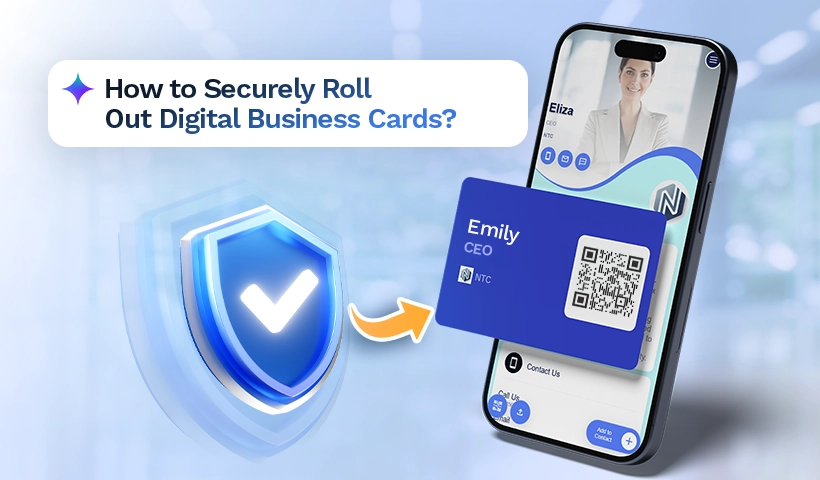
A secure rollout is planned. Here is how to do it right.
Set your standards first
Before a single card goes live, define what goes on it. Required fields, optional fields, approved links, profile photo guidelines, and QR usage rules. Get marketing to sign off on the visual identity, and have HR confirm which employee information is appropriate to display.
Assign clear ownership
Marketing owns the brand. HR owns the employee data. Sales owns lead capture requirements. IT or operations owns access and digital business card security settings. When everyone knows their lane, updates happen faster, and gaps get caught sooner.
Start with your highest-visibility teams
Sales, business development, leadership, and recruiting are the most frequent sharers of contact details. Roll out to these teams first. You will see immediate adoption, get early feedback, and refine your templates before expanding company-wide.
Track what is happening
Your digital business card platform should show you card views, QR scans, lead form activity, and engagement by team or campaign. Use that data. It tells you where networking is working and where follow-up processes need improvement.
Review regularly, not just at launch
Access permissions go stale. Links change. Employees move roles. Build a regular review into your operations calendar, especially after hiring cycles, large events, and organizational changes.
The bottom line
Digital business cards are secure. Companies that manage them with clear standards, centralized controls, and consistent oversight will find them safer and more trackable than ever before.
The companies that run into trouble are the ones that hand employees a free tool and walk away.
Your contact sharing strategy deserves the same attention as any other part of your go-to-market operation. It is the moment your team meets the world.
Make it secure, consistent. and easy to manage.
Frequently asked questions
Does Digital Business Card PRO have SOC-2 certification and GDPR compliance?
Yes. Digital Business Card PRO is SOC 2 certified and GDPR compliant. Enterprise customers can also request a Data Processing Agreement (DPA), which formally defines how your company’s data is collected, stored, and protected. All data is encrypted at rest and in transit. These credentials matter when procurement, legal, or IT teams review vendor security before approving a company-wide rollout.
Does Digital Business Card PRO support SSO integration?
Yes. Digital Business Card PRO supports Single Sign-On (SSO) integration with major identity providers. This means employee cards can be created and managed automatically through your existing directory, login is handled through company credentials, and access is revoked the moment an employee is offboarded. For IT and operations teams managing large workforces, SSO reduces manual overhead and closes access gaps that create digital business card security risks.
Can someone misuse a digital business card?
Yes, if cards are unmanaged or created on unverified tools. Someone can build a profile that looks like it belongs to your company. Branded templates, admin controls, and role-based permissions significantly reduce this risk.
Do digital business cards expose employee personal data?
Not if the platform is set up correctly. A secure system lets you control exactly what appears publicly. Employees can use work emails and business numbers instead of personal contact details.
Are QR codes on digital business cards safe?
When they point to verified, company-managed profiles, yes. The QR code is just the access point. The risk lies in where it points. Random generators and uncontrolled destinations are where the danger sits.
Should employees create their own digital business cards?
For business use, no. When employees use personal tools, branding, data accuracy, and access control all suffer. A company-managed system keeps everything consistent and gives your team the control it actually needs.
You may also like
Professional Email Signature Guide: What to Include and How to Create One
This guide discusses what a professional email signature is, what to include in it, how to create one, and how to use it with your digital card.
How Much Does a Digital Business Card Cost? (2026 Pricing Guide)
This guide helps you understand how much a digital business card costs and how much to invest based on your requirements.
How to Build a Personal Brand at Work Without Sounding Like Everyone Else
Learn how to build a personal brand at work using tactics that work inside a team: 1:1s, credit-sharing, and internal visibility.
Essential Tools for Field Sales Reps: What to Look for Before Choosing One
A practical framework for evaluating essential tools for field sales reps and the mistakes that break rep consistency in the field.