Networking is one of the strongest drivers of business growth because it creates trust faster than cold outreach, ads, or generic online interactions. In fact, sales teams witness 36% higher revenue and 37% more closed deals through in-person meetings.
They spend serious time and money creating these opportunities through trade shows, conferences, client visits, partner meetings, demos, local meetups, and everyday sales conversations.
Many of these interactions create real interest. A prospect asks questions, shares a pain point, discusses timelines, or says, “Send me the details.” The rep shares a physical or digital business card, and the moment feels like a win.
But if the rep does not collect the prospect’s details, the prospect now owns the next step.
If they remember, they may reach out. If they get busy, lose interest, forget the rep’s name, or delay the decision, the opportunity quietly disappears.
That is the gap digital business card lead generation solves. It turns contact sharing into a two-way contact exchange, so sales teams can capture prospect details at the moment of interest and follow up instead of waiting to be remembered.
A high-value conversation should not depend on “I’ll get back to you.”
Key Takeaways:
- Networking only works when prospects are captured, not just contacted.
- One-way contact sharing leaves follow-up in the prospect’s hands.
- Digital cards make sharing faster, richer, and more professional.
- Lead forms turn digital business cards into two-way contact exchanges.
- Captured leads help sales teams follow up faster and with context.
- Digital business cards already give sales teams a major advantage
- One-way contact sharing weakens follow-up. Two-way exchange fixes it.
- How Digital Business Card PRO turns your card into a lead capture machine
- How to make lead capture feel like a natural next step
- Final thoughts
- Frequently Asked Questions
Digital business cards already give sales teams a major advantage
Digital cards solve a real problem for sales teams. They make contact sharing faster, easier, and more useful than paper cards.
A rep can share their details through a QR code, NFC card, link, email signature, or messaging app. The prospect does not need to manually type a phone number, search for the rep on LinkedIn, or hold on to a physical card after a busy event.
For sales teams, that creates several clear advantages:
- Faster contact sharing: Reps can share their details instantly during events, meetings, demos, or field visits.
- Richer profile experience: Prospects can access contact details, company information, website links, social profiles, product pages, and sales resources from one place.
- Always-updated information: If a rep’s role, phone number, calendar link, or company details change, the digital card can be updated without reprinting anything.
- More professional brand presence: Teams can use consistent designs, logos, colors, and messaging across every sales rep’s card.
- More ways to connect: Prospects can save contact details, book a meeting, visit a product page, or continue the conversation through the channel they prefer.
That is a major improvement over a paper card.
But it does not automatically solve the lead capture problem. Even with a digital card, many exchanges remain one-way. The prospect receives the rep’s information, but the sales team does not receive the prospect’s details.
Digital cards solve the sharing problem. To generate leads, they also need to support contact capture.
One-way contact sharing weakens follow-up. Two-way exchange fixes it.
One-way contact sharing puts too much responsibility on the prospect.
The rep has done their part by sharing contact information. But if they do not collect the prospect’s details, the entire follow-up depends on the prospect taking action later. And most prospects do not.
Not because they are uninterested. Because they are busy, they meet several people at events, return to packed inboxes, forget names, delay decisions, or intend to follow up and never get to it.
That is the biggest gap in sales networking: if you do not collect the prospect’s contact details, you do not control the follow-up.
A prospect may scan your card but never book a call. A decision-maker may say, “Send me the details,” but you never collect their email. A buyer may like your solution at an event, but your rep waits for them to reach out. A warm conversation may never reach the CRM.
This is where digital business card lead generation becomes important. It helps sales teams move from passive sharing to active lead capture.
Two-way exchange gives sales teams control of follow-up
In a one-way exchange, the rep shares their details and waits. In a two-way exchange, the rep shares their details and captures the prospect’s details at the same moment.
That one change shifts the entire process. The rep can follow up first, personalize the message, add the lead to the right workflow, prioritize high-intent prospects, and keep the opportunity from disappearing.
Networking should not end with “Here’s my card.” It should end with “Let’s stay connected, and I’ll send you the right details.”
That is what turns a digital business card from a contact-sharing tool into a bridge between conversation and follow-up.
How Digital Business Card PRO turns your card into a lead capture machine
Most digital business cards stop at sharing. Digital Business Card PRO goes further by letting you add a lead-capture form directly to your card, so every share becomes a two-way exchange.
Instead of waiting for the prospect to follow up, you collect their details at the moment of interest and stay in control of the next step.
Here is how the process works.
Step 1: Create your card and set up the lead capture form
Start by signing up on Digital Business Card PRO and creating a new card.
Inside the Content section, you will find a component called “Get in touch.” This is where you configure your lead capture form.
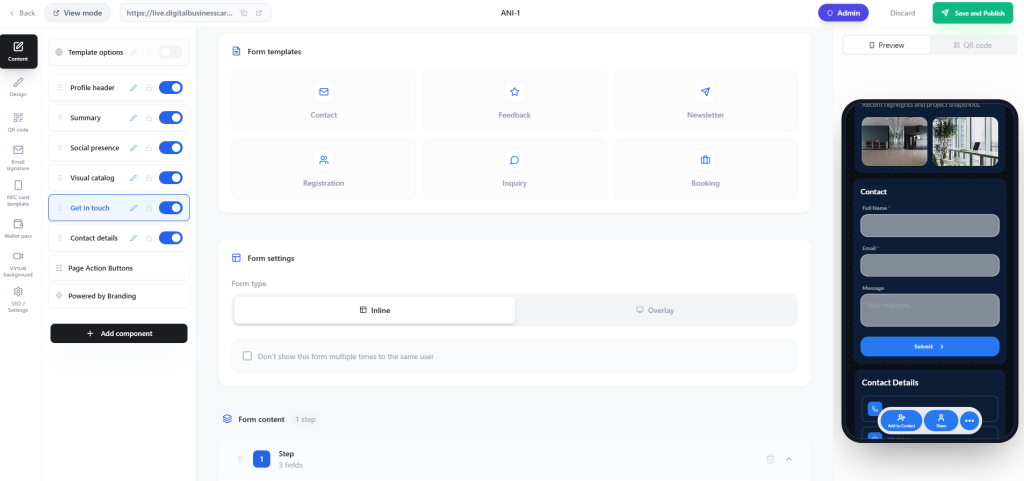
You have two setup choices to make:
- Form template: Choose the “Contact” template if you want to collect basic prospect details like name, email, and phone number. Other templates are available depending on what information matters most to your sales process.
- Display style: Set the form to appear either inline on the card page or as an overlay pop-up, depending on what feels right for your audience.
Once you select your template, scroll to the Form Content section to edit the fields and decide exactly what information you want to ask. Every change reflects instantly in the mobile preview, so you can see exactly what your prospect will see before you publish.
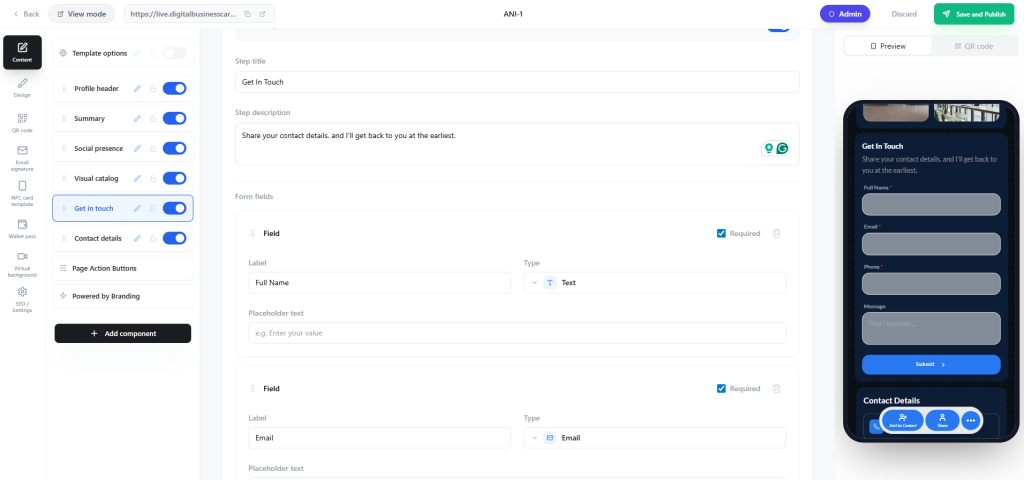
Edit the form fields, including the form fields and the details you want to ask from your prospects.
All the changes you make will be reflected in real time in the mobile preview.
When the card is ready, click Save and Publish, then start sharing it through NFC cards, QR codes, links, or any channel your team already uses.
Step 2: The prospect opens your card and submits their details
When a prospect opens your digital business card, they see your contact information, links, and resources. As they scroll, the lead capture form appears naturally within the card experience.
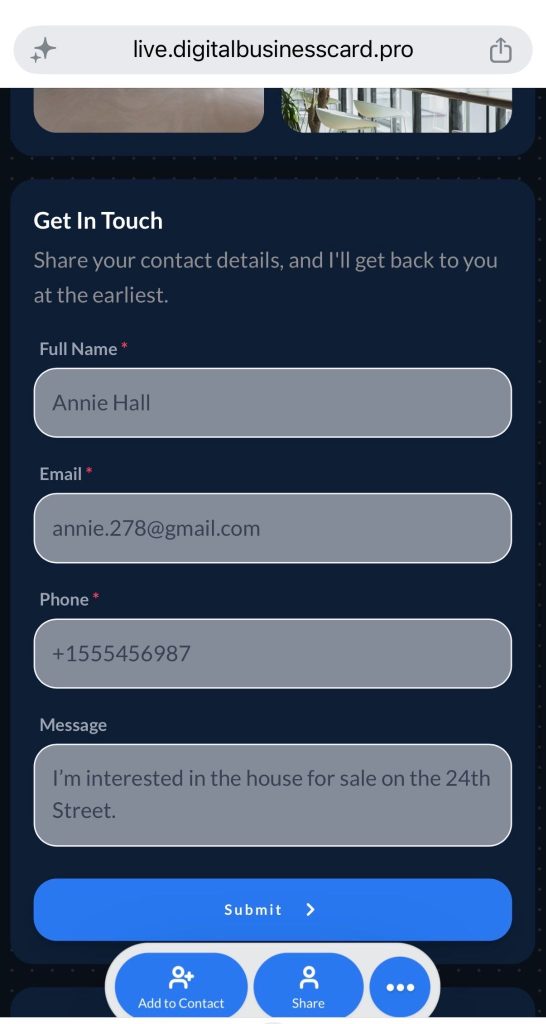
It takes seconds to fill out. No friction, no redirects, no separate landing page to visit. The prospect submits their details and moves on. You get what you need to follow up.
Step 3: Leads are saved automatically to your dashboard
Every form submission saves directly to the Leads section of your Digital Business Card PRO dashboard. No manual data entry, no chasing down notes from a networking event, no lost contacts.
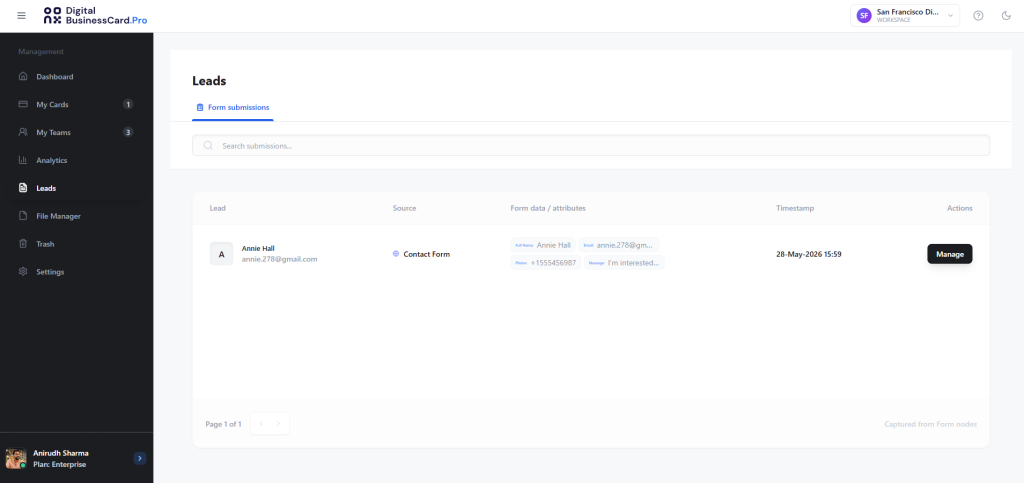
Each lead entry captures the details the prospect submitted, tied to the card interaction. Your team has a clean, organized list ready to act on.
Step 4: Follow up with context, not guesswork
From the Leads dashboard, you can move quickly and follow up on every opportunity.
A few things that make follow-up more organized:
- Tags: Assign tags to each lead to segment by event, campaign, rep, or deal stage.
- Notes: Add internal notes to each contact profile so the rep who follows up has context from the original conversation.
Step 5: Track performance across your team
Head to the Analytics tab in your dashboard to view helpful insights. Here, you monitor:
- Total card views
- Leads generated
- Contacts saved

You can view a timeline analysis (by hour and day) and also view performance across devices, browsers, and locations.
The result is a card that does not just introduce your rep. It starts the lead generation process the moment a prospect opens it.
How to make lead capture feel like a natural next step
Adding a lead capture form is the first step. The next step is making sure people actually submit it and that your sales team gets useful information from it.
The goal is not to collect every possible detail. The goal is to collect enough information to continue the conversation with context.
Ask for details that help the sales conversation
Keep the form short but useful. At a minimum, ask for the prospect’s name, work email, company name, and message or requirement.
Depending on the sales context, you can also ask for:
- Phone number
- Job title
- Area of interest
- Preferred follow-up method
- Buying timeline
- Event or meeting context
For trade shows or networking events, keep the form simple. People are moving quickly, and a long form can stop them from submitting. For warmer sales conversations, you can ask for more context, such as what they are looking for or when they plan to evaluate a solution.
Make the ask feel natural
A lead form works best when it feels like the next step in the conversation, not a sudden sales request.
Instead of saying, “Fill out this form,” a rep can say, “Scan my card and leave your email there. I’ll send you the product details we discussed.”
Or, “Add your details and mention what you’re looking for, so I can send the right information instead of a generic brochure.”
This makes the form feel helpful. The prospect understands why they are sharing their details, and the rep gets the context needed for a better follow-up.
Follow up while the conversation is still fresh
Once the lead is saved in the Digital Business Card PRO dashboard, the sales team should act quickly. A fast follow-up works best when it also feels personal.
The first message should mention the conversation, the prospect’s interest, and the next step they expect.
For example, instead of saying, “Great connecting with you,” the rep can say, “You mentioned that your team is looking for a better way to capture leads at events. Here’s the workflow we discussed.”
That kind of follow-up feels relevant because it connects directly to the conversation.
Avoid mistakes that reduce lead submissions
Small choices can weaken the entire lead capture process. Sales teams should avoid:
- Asking for too much information too early
- Adding too many links around the form
- Asking prospects to reach out later instead of capturing their details now
- Waiting too long to review and follow up with new leads
- Using the same form for every event, audience, or sales motion
A good digital business card should make sharing easy for the rep, submitting details easy for the prospect, and follow-up easy for the sales team.
Final thoughts
Networking creates opportunities, but follow-up turns those opportunities into a pipeline. If your sales team only shares contact details and waits for prospects to respond, too many good conversations will disappear before they become real leads.
Digital business cards already make contact sharing faster, richer, and more professional. But the bigger advantage comes when they support two-way contact exchange. With a lead capture form on the card, reps can collect prospect details at the moment of interest, save them in the Leads section, and follow up while the conversation is still fresh.
That is what makes digital business card lead generation valuable for sales teams. It gives reps a simple way to move from “Here’s my card” to “I’ll send you the right details.”
Frequently Asked Questions
What is digital business card lead generation?
Digital business card lead generation means using your digital business card to collect prospect details, not just share your own. It helps sales teams capture interest during networking conversations and follow up with prospects later.
How does Digital Business Card PRO help capture leads?
Digital Business Card PRO lets you add lead capture forms to your digital business card. When someone opens your card, they can submit their contact details, which are saved in the Leads section of your dashboard.
Why is two-way contact exchange important for sales teams?
Two-way contact exchange gives sales teams control over follow-up. Instead of waiting for prospects to reach out, reps can collect their details during the interaction and follow up directly.
What details should sales reps collect through a digital business card?
Sales reps should collect essential details such as name, work email, company, phone number, interest area, and message. The form should stay short enough for prospects to complete quickly.
Are digital business cards useful for trade shows and events?
Yes. Sales reps can share their digital business cards during event conversations and ask interested prospects to submit their details through the form, making post-event follow-up faster and more organized.
You may also like
Professional Email Signature Guide: What to Include and How to Create One
This guide discusses what a professional email signature is, what to include in it, how to create one, and how to use it with your digital card.
5 Best Event Lead Capture Tools in 2026
Event lead capture gets messy fast. Let’s look at the five best event lead capture tools, and how to choose the right one.
How Much Does a Digital Business Card Cost? (2026 Pricing Guide)
This guide helps you understand how much a digital business card costs and how much to invest based on your requirements.
How to Integrate Digital Business Card with Your HubSpot
Learn how to connect HubSpot with Digital Business Card PRO, map form fields, and automatically send digital business card form submissions to HubSpot.