For consulting companies and agencies, business opportunities can begin anywhere: in a prospect’s office, during a strategy call, through a referral, online, or after a presentation.
The setting changes, but the challenge stays the same. How do you turn that first conversation into a clear next step?
A regular business card only shares contact details. A website may feel too broad. A pitch deck may be too much too soon.
That is where a digital business card becomes more than a contact-sharing tool.
When built well, it works like a landing page: a focused, mobile-first profile that explains who you are, what you do, why prospects should trust you, and how they can take action.
For individual consultants, this creates a sharper personal profile. For agencies and consulting firms, it creates a consistent, branded, lead-ready profile for every client-facing team member.
Key Takeaways:
- Digital cards can guide prospects from interest to action.
- Agencies and consultants need more than contact details to build trust.
- Landing pages combine proof, links, CTAs, and forms.
- Agencies can keep every team profile branded and consistent.
- Centralized cards help teams capture and measure leads.
- Why every consulting conversation needs more than contact details
- What it means to turn a digital business card into a landing page
- How centralized management makes digital business cards work better for teams
- How to create digital business cards that function like landing pages
- Tips and best practices to follow
- Final thoughts
- Frequently asked questions
Why every consulting conversation needs more than contact details
Consulting and agency conversations are rarely transactional. A prospect is not just deciding whether to save your number. They are trying to understand whether you can solve a real business problem, whether your approach fits their needs, and whether they can trust you enough to continue the conversation.
That is why contact details alone are not enough.
A name, email address, phone number, and LinkedIn profile may help someone reach you, but they do not explain your expertise, show your best work, answer buyer questions, or make the next step obvious.
This matters because consulting and agency decisions often involve multiple layers of evaluation. A prospect may want to:
- review your services
- share your profile with a colleague
- check your portfolio
- look at past results
- book a follow-up call after the initial conversation
If that information is scattered across emails, websites, PDFs, and social profiles, momentum slows down.
Digital business cards for consultants solve this by giving every conversation a focused destination. They bring your contact details, services, proof, portfolio links, booking options, and inquiry forms into one mobile-first profile.
For agencies and consulting firms, this matters at the team level too. Every consultant, strategist, partner, account manager, and business development professional represents the firm in front of prospects. A digital business card for teams gives each person a professional profile while giving the organization control over branding, messaging, links, and lead capture.
What it means to turn a digital business card into a landing page
A landing page is not a digital business card packed with every link, file, service, and social profile. That only creates clutter.
It is a focused, mobile-first profile that helps a prospect move from interest to action.
A regular digital business card answers: “How can someone contact me?”
A landing page answers: “Why should someone continue this conversation with me?”
For consultants and agencies, that means giving prospects the right context, proof, resources, and next step in one place.
For teams, it also means keeping every client-facing profile consistent. The organization controls the design, messaging, service links, proof assets, and call to action, while each consultant or team member gets a profile they can share confidently.
A clear positioning statement
Your digital business card should quickly explain what you do and who you help. Instead of using only a vague title like “Founder,” “Consultant,” or “Managing Partner,” use a short value statement that gives prospects a reason to keep reading.
For example: “I help B2B SaaS companies improve lead generation with sharper positioning, funnel strategy, and conversion-focused campaigns.”
Services or expertise areas
A landing page should help prospects quickly understand whether your services match their needs.
For a consulting firm, this could include strategy, operations, digital transformation, market research, or sales enablement. For a marketing agency, it could include branding, performance marketing, website design, content, SEO, or creative production.
Keep this section simple and scannable. The goal is not to explain everything. The goal is to help the prospect identify fit.
Proof of work
Consultants and agencies are judged by credibility. Add proof points that show you have solved similar problems before.
This could include case studies, portfolio links, client results, testimonials, awards, certifications, or selected project examples. Even one strong proof element can make the profile more trustworthy.
Useful links and resources
A good landing page helps prospects continue exploring without making them search manually.
Add only the links that support the next step, such as a portfolio, service page, company website, proposal deck, brochure, calendar, LinkedIn profile, case study, or relevant article. If a link does not help the prospect understand, trust, or act, leave it out.
A focused call to action
Every landing page needs one clear next step.
For consultants and agencies, the CTA could be “Book a discovery call,” “Request a consultation,” “View our work,” “Send an inquiry,” “Download our agency deck,” or “Discuss a project.”
The CTA should match the stage of the conversation and make action easy while interest is still fresh.
A lead capture option
Not every prospect will call or email immediately. A lead capture form gives them a simple way to share a requirement, ask a question, request more information, or start a project conversation.
This is what separates a basic contact profile from a landing page. The card does not just help people reach you. It helps you capture and continue the opportunity.
How centralized management makes digital business cards work better for teams
A solo consultant may only need one strong digital business card. An agency or consulting firm, however, needs consistency across every person who represents the business.
When multiple team members interact with prospects—through meetings, sales calls, workshops, partnerships, or client relationships—each profile becomes part of the firm’s brand experience. Without consistency, the firm risks losing control over how it is perceived.
DigitalBusinessCard.Pro helps agencies and consulting firms solve this by offering centralized management for creating, updating, and maintaining branded employee digital business cards.
Here’s why DigitalBusinessCard.Pro is the preferred choice of global agencies and consulting firms:
Consistent branding across all profiles
- Maintain uniform logos, colors, templates, messaging, and CTAs
- Ensure every client-facing profile reflects the agency or consulting firm’s identity
- Allow individual personalization without compromising brand standards
Simplified updates and maintenance
- Update services, case studies, links, and messaging from one central location
- Avoid manual updates by individual team members
- Keep all profiles current as the business evolves
Scalable lead capture across the team
- Enable every team member to capture inquiries, consultation requests, referrals, and partnerships
- Extend lead generation beyond the website or sales team
- Turn every interaction into a potential opportunity
Improved visibility through analytics
- Track how prospects engage with profiles, links, CTAs, and forms
- Identify which team members, services, or campaigns drive the most interest
- Use insights to refine outreach and improve conversion
Better control as the organization grows
- Manage multiple team members and profiles efficiently
- Ensure consistency across departments and roles
- Maintain a unified brand experience at scale
For growing firms, digital business cards for consulting firms become more than just profiles. They act as a centralized management layer that keeps teams aligned, ensures brand consistency, and helps measure engagement across every client-facing interaction.
How to create digital business cards that function like landing pages
DigitalBusinessCard.Pro allows teams to create on-brand, information-rich digital business cards that function as landing pages.
For agencies and consulting firms, the best approach is to start with a team structure.
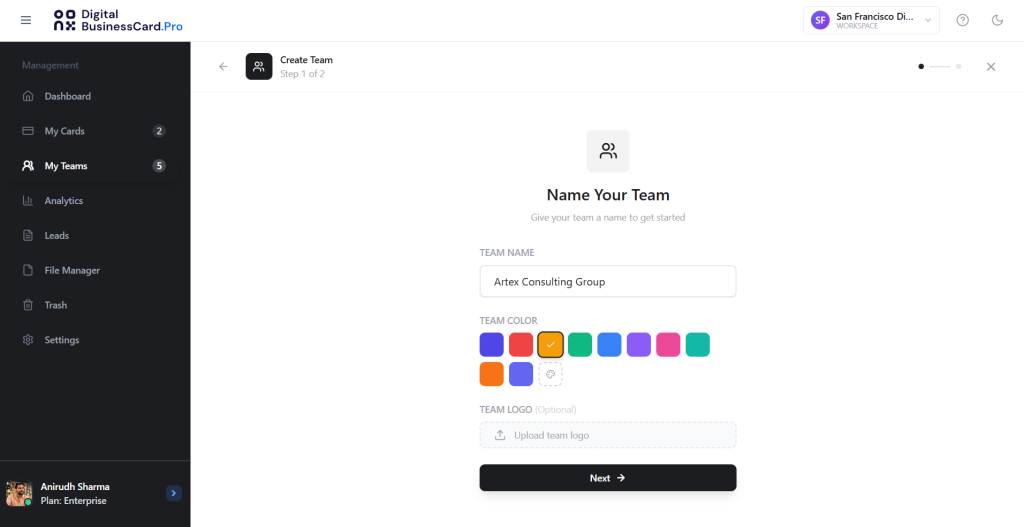
1. Log in to your DigitalBusinessCard.Pro account, go to My Teams, and create a new team.
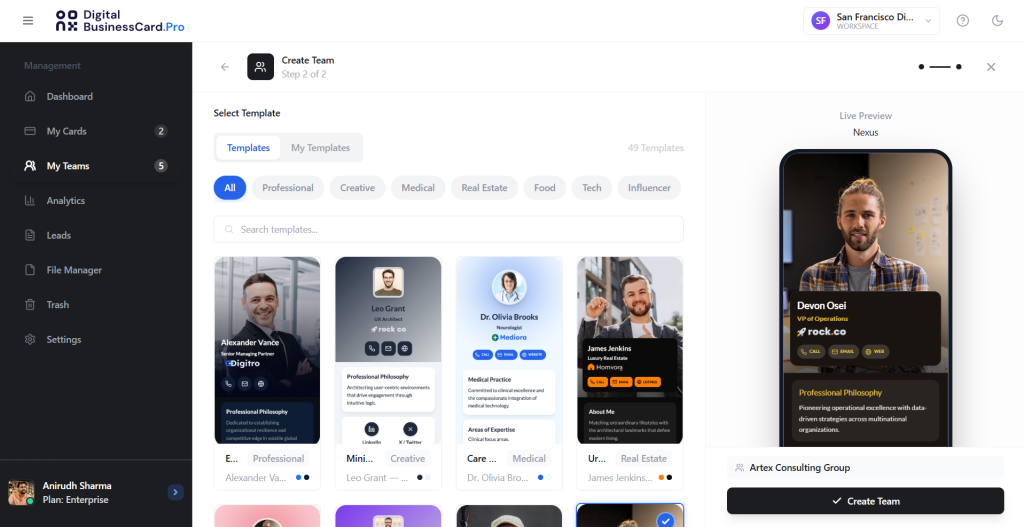
2. Then create a digital business card template that can be applied across all member cards.
3. Select the fields you want every card to include, and lock the elements you do not want team members to change, such as the company logo, brand links, approved CTAs, or key service information.
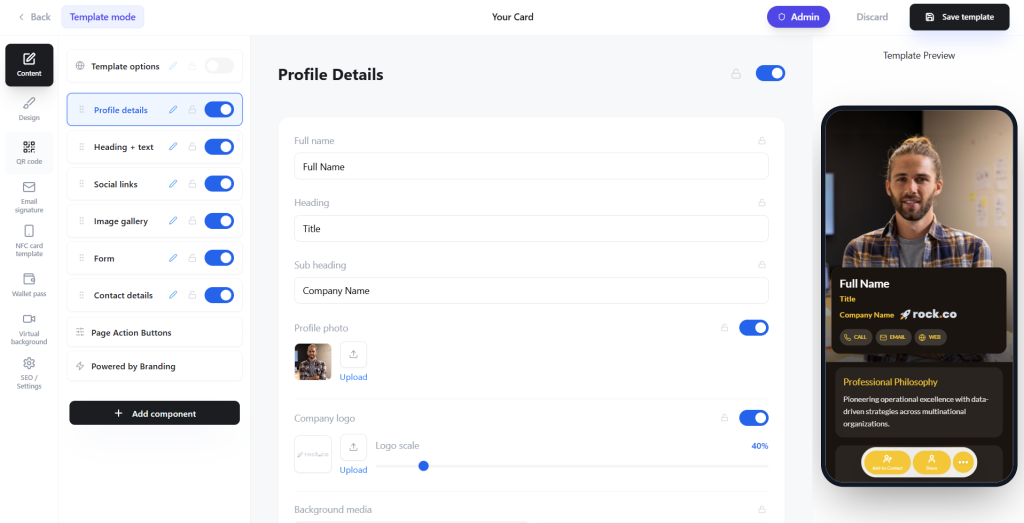
For agencies and consultants, a high-functioning digital business card can include:
- name and contact information
- a professional headshot
- a professional summary
- list of services provided
- portfolio links
- social proof
- lead capture form
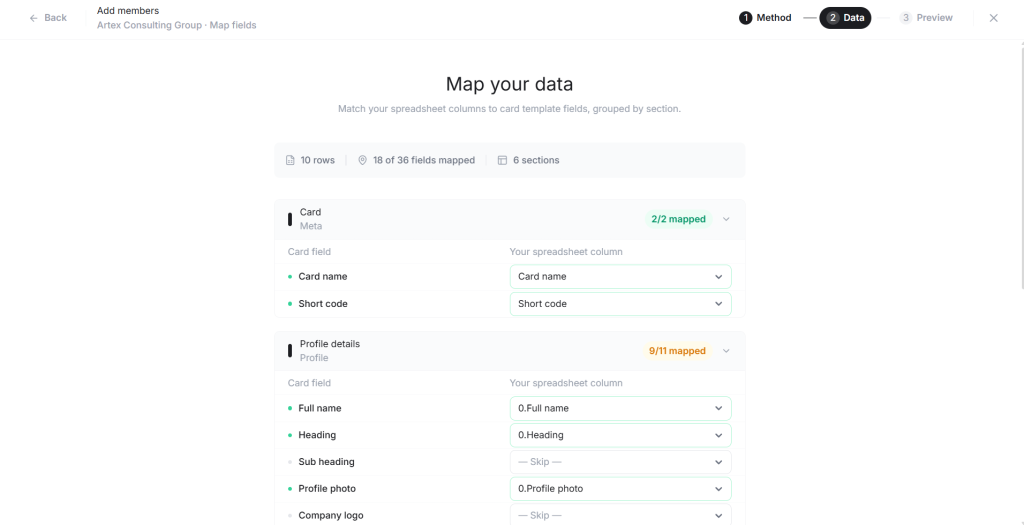
4. Once the template is ready, save the card and add team members manually or by uploading a spreadsheet or CSV file.
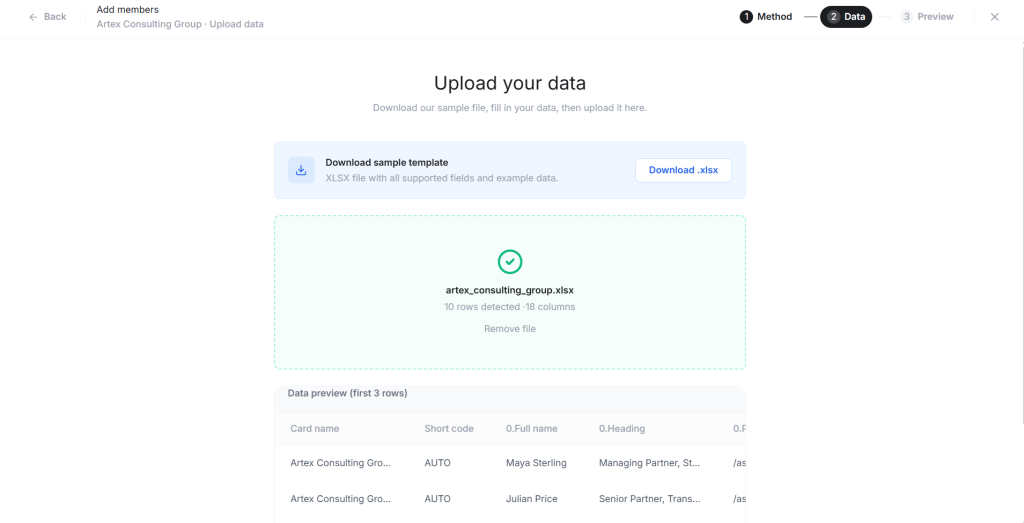
5. Map the columns in your spreadsheet to the fields in your digital business card template.
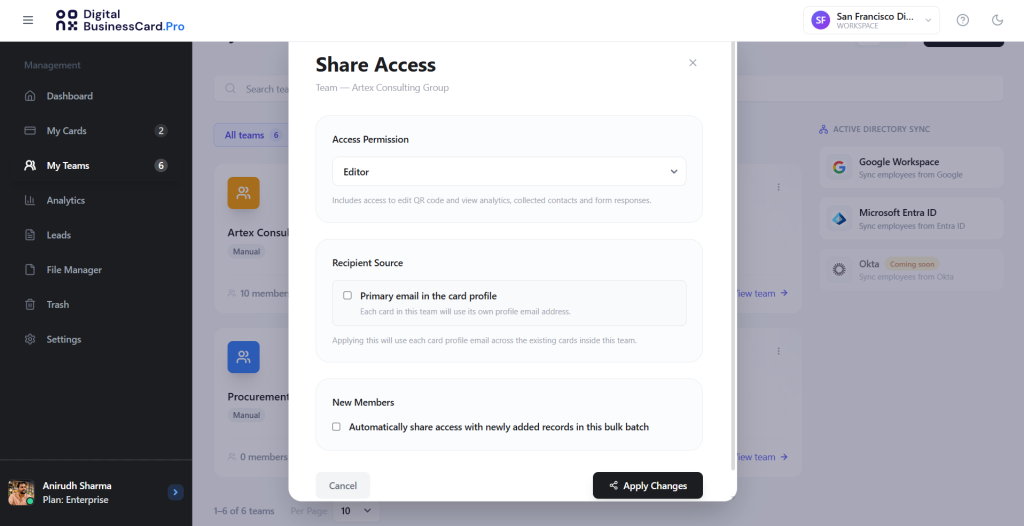
6. You can then share edit access with team members so they can add or update their own information within the structure you control.
For a detailed guide to creating cards for your entire team, check out: How Enterprises Can Manage Hundreds of Digital Business Cards Across Multiple Teams
Note: If you are creating a digital business card as an individual consultant or agency owner, go to My Cards, click Create new card, choose a template, select the fields you want, and save it. Your digital card is ready to share with prospects.
Tips and best practices to follow
A digital business card works best as a landing page when it stays focused, intentional, and easy to act on. For consultants, the goal is to help prospects quickly understand your value. For agencies and consulting firms, the goal is also to keep every client-facing profile consistent, branded, and lead-ready.
Keep the profile focused
Do not turn your digital business card into a complete website. Highlight only what matters after a professional conversation: who you are, what you help with, why you are credible, and what the prospect should do next.
For organizations, this focus should be built into the template so every profile stays useful, scannable, and aligned with the firm’s sales process.
Lead with one clear message
Your opening line should quickly explain who you help and what problem you solve. Use a short value statement instead of a generic title.
For teams, this message should connect back to the firm’s positioning. Individual roles can vary, but every profile should reinforce the same brand promise.
Use proof, not just claims
Anyone can say they are experienced or results-driven. Strong proof makes those claims believable. Add case studies, portfolio links, testimonials, client logos, certifications, awards, or measurable results.
For agencies and consulting firms, keep approved proof assets centralized so employees share current, brand-approved resources.
Make the next step obvious
Use one primary call to action, such as “Book a consultation,” “View our work,” “Request a proposal,” or “Send an inquiry.”
For enterprise teams, standardized CTAs create a consistent prospect experience and make lead routing easier.
Keep links intentional
Every link should support the prospect’s decision-making process. Avoid adding too many social profiles, PDFs, articles, or service pages just because they are available.
For organizations, approved links, decks, service pages, and resources should be managed centrally so teams are not sharing outdated or off-brand assets.
Design for mobile first
Most prospects will open your digital business card on a phone. Keep the layout clean, sections short, and buttons easy to tap.
For teams, mobile-first design should be handled at the template level so every employee profile looks polished without each person making design decisions.
Update it regularly
An outdated digital business card can weaken trust quickly. Review your profile whenever services, portfolio, team details, calendar links, or contact information change.
For agencies and consulting firms, centralized updates keep shared messaging, links, CTAs, and proof assets current across every employee profile.
Keep team profiles consistent
For agencies and consulting firms, one polished profile is not enough. Every consultant, strategist, account manager, partner, and business development team member should follow the same brand, structure, and messaging standards.
DigitalBusinessCard.Pro helps organizations create branded employee profiles, manage them centrally, and turn every team member’s digital business card into a consistent, lead-ready landing page.
Final thoughts
For consultants and agencies, every conversation has the potential to become something bigger: a discovery call, a proposal request, a referral, a partnership, or a long-term client relationship. But that only happens when the next step is clear.
A digital business card gives prospects more than a way to contact you. When built like a landing page, it gives them context, credibility, proof, useful resources, and a simple path to take action.
For individual professionals, digital business cards for consultants help turn interest into a clear next step. For agencies and consulting firms, the value becomes even stronger at the team level. DigitalBusinessCard.Pro helps firms move from individual contact sharing to centralized business card management, where every employee profile supports trust, brand consistency, lead capture, and measurable engagement.
A digital business card is no longer just a modern version of a paper card. For consultants and agencies, it can become a compact trust-building asset that keeps conversations moving and turns professional interest into measurable opportunity.
Frequently asked questions
What is a digital business card landing page?
A digital business card landing page is a focused, mobile-first profile that goes beyond basic contact details. It can include your services, portfolio, case studies, testimonials, booking link, lead capture form, and other useful resources so prospects can understand your expertise and take the next step from one place.
Why should consultants use digital business cards instead of only sharing a website or LinkedIn profile?
Digital business cards for consultants are more focused than a website and more conversion-ready than a LinkedIn profile. A website may have too much information, while LinkedIn is built for general professional visibility. A digital business card gives prospects a simple, direct profile with the most relevant information, proof, and call to action after a conversation.
How can agencies use digital business cards across their teams?
A digital business card for agencies can help every strategist, account manager, consultant, partner, and business development professional share a consistent branded profile. Agencies can use centralized templates, approved links, service information, CTAs, and lead capture forms to keep every client-facing profile aligned with the firm’s brand and sales process.
What should consultants and agencies include on a digital business card?
A strong digital business card should include contact details, a clear positioning statement, service or expertise areas, proof of work, useful links, a focused call to action, and a lead capture option. For agencies and consulting firms, it should also follow a consistent brand structure so every team member’s profile feels connected to the same organization.
How do digital business cards for consulting firms help with lead capture?
Digital business cards for consulting firms turn every client-facing profile into a lead capture channel. Prospects can submit inquiries, request consultations, share project requirements, or book follow-up calls directly from the card. This helps firms capture interest from conversations instead of relying only on email follow-ups, websites, or individual inboxes.
You may also like
Professional Email Signature Guide: What to Include and How to Create One
This guide discusses what a professional email signature is, what to include in it, how to create one, and how to use it with your digital card.
5 Best Event Lead Capture Tools in 2026
Event lead capture gets messy fast. Let’s look at the five best event lead capture tools, and how to choose the right one.
How Much Does a Digital Business Card Cost? (2026 Pricing Guide)
This guide helps you understand how much a digital business card costs and how much to invest based on your requirements.
How to Integrate Digital Business Card with Your HubSpot
Learn how to connect HubSpot with Digital Business Card PRO, map form fields, and automatically send digital business card form submissions to HubSpot.