Creating one digital business card is simple. Managing hundreds across departments, regions, sales teams, leadership groups, and client accounts is where the challenge begins.
At enterprise scale, digital business cards become part of employee identity, brand consistency, lead capture, and daily team operations. Every card needs accurate details, approved branding, the right links, and clear ownership. Every update needs to happen quickly without creating extra work for HR, marketing, sales, or operations teams.
That is hard to manage with scattered profiles, manual updates, and one-off card creation. Small inconsistencies can lead to outdated employee information, off-brand designs, missed leads, and poor cross-team control.
This is why enterprise digital business cards need a structured system.
Let’s look at what enterprise teams need to manage digital cards at scale and how Digital Business Card PRO helps companies manage them with greater control, consistency, and efficiency.
Key Takeaways:
- Managing enterprise digital business cards requires a system.
- Directory sync and bulk upload help enterprises create and update employee cards faster.
- Locked templates help teams stay on-brand while reducing manual review and corrections.
- Role-based access and subaccounts let teams share management without losing control.
- Digital Business Card PRO helps enterprises manage cards from one scalable platform.
- Challenges of managing enterprise digital business cards at scale
- How Digital Business Card PRO helps create and manage enterprise digital business cards across teams
- Best practices for creating and managing enterprise digital business cards
- Final thoughts: Enterprise digital business card management needs structure
- Frequently Asked Questions
Challenges of managing enterprise digital business cards at scale
The challenge is not creating a digital business card. It is managing hundreds of cards, users, teams, brands, domains, and access rules without confusion or inconsistency.
For small teams, manual updates may work. For enterprises with multiple teams and departments, the same process becomes slow and difficult to control.
Employees join, leave, change roles, move teams, and represent different departments. Each change affects what their card should show and who should manage it.
Manual card creation slows down onboarding and offboarding
Enterprise onboarding costs an average of $3,000 or more per employee. Asking HR or admin teams to create every digital business card from scratch adds unnecessary work to an already resource-intensive process. It increases the risk of cards going uncreated or being created inconsistently.
The risk compounds during offboarding. When an employee leaves, their card needs to be discontinued promptly, especially if it features company branding, lead-capture forms, or a custom domain. Without automation, that step gets missed.
Employee details change constantly
The average voluntary turnover rate in the U.S. currently sits at around 13%, meaning roughly 1 in 8 employees leave every year.
In large organizations, that translates to hundreds of role changes, department transfers, and exits happening on a rolling basis. Every one of those changes affects what an employee’s card should display and who should be managing it.
When that process is manual, outdated cards stay live. Prospects reach the wrong person. Follow-ups stall. And HR, marketing, or admin teams end up fixing problems that a centralized system should have prevented.
Different teams need different card structures
A sales rep, a customer success manager, and a senior executive do not need the same card. Sales teams need lead capture and calendar booking. Leadership needs polished executive profiles. Support teams may need links to documentation and help resources.
Forcing every department into the same card format creates friction, but letting every team build independently creates chaos.
Enterprises need a system that accommodates these differences without forcing every team into a single format or weakening brand control.
Brand inconsistency becomes a real risk
Companies with consistent brand presentation across all platforms can see revenue increases of up to 23%, according to research tracking thousands of brands across multiple industries.
Clearly, companies require brand guidelines that are widely used and recognized throughout the organization.
A digital business card is often the first branded touchpoint after a meeting or event. When employees create or edit their own cards without oversight, you end up with inconsistent logos, colors, job titles, and messaging.
At scale, that is not just an aesthetic problem; it is a trust and revenue problem.
Access control becomes difficult without proper team access
As digital business cards scale across departments, one admin should not have to manage every card, update, and team request alone. Enterprises need a way to add users to a workspace and give them the right level of access.
Without proper role-based access, card management becomes either too centralized or too open. Teams wait on admins for every small change, or users get broader permissions than they need. Both situations create delays, confusion, and governance risks.
Security becomes harder to control
Enterprise digital business cards often include employee contact details, company links, lead capture forms, and customer-facing assets. If the platform is not secure, sensitive employee and lead data can become harder to protect.
Low-security systems also create governance risks. Teams may lack control over who can access cards, how data is handled, whether inactive employee cards stay live, and whether the platform meets company compliance expectations. For enterprises, security should be part of the card management decision from the start.
How Digital Business Card PRO helps create and manage enterprise digital business cards across teams
Digital Business Card PRO provides enterprise teams with a structured system for creating, standardizing, distributing, and tracking digital business cards across all departments, regions, and business units.
Add team members through directory sync or CSV upload
Creating cards one by one does not work when you are rolling out digital business cards across hundreds or thousands of employees.
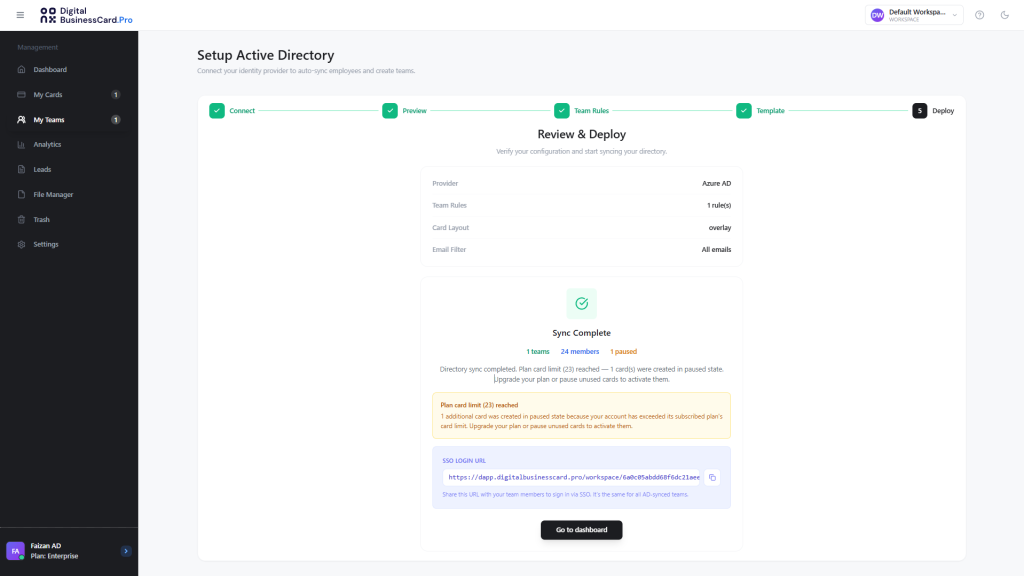
Digital Business Card PRO integrates directly with Google Workspace and Microsoft Entra ID, so card creation and deletion can be automated as employees join, move teams, or leave the organization.
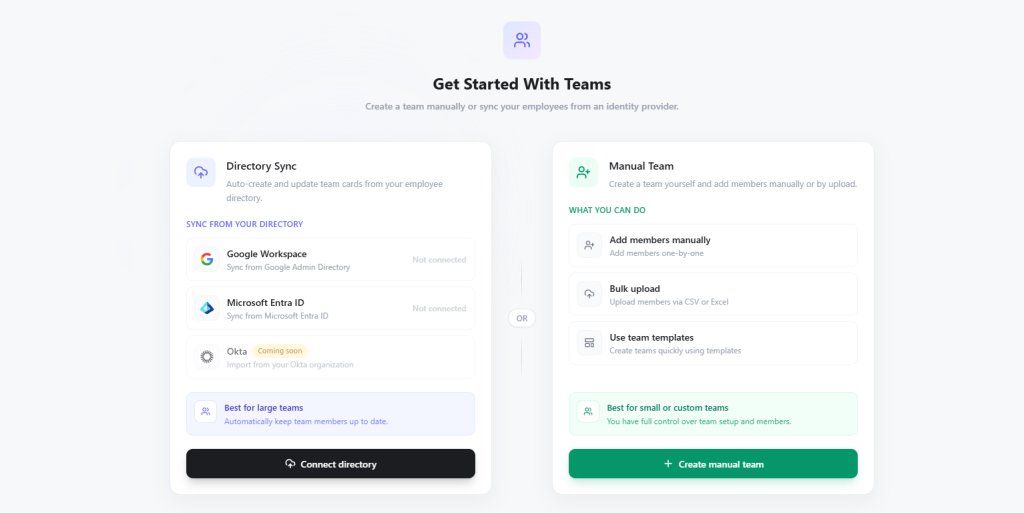
This helps HR and IT teams onboard employees faster and discontinue cards more cleanly when people leave. It also reduces the risk of inactive cards remaining live with company branding, contact details, or lead-capture links.
For companies that prefer a manual or phased rollout, Digital Business Card PRO also supports team creation through CSV or Excel upload. This works well for department-level launches and seasonal hiring cycles.
Set locked templates for brand consistency
Brand consistency becomes harder when every employee can independently design or edit their card. Logos, colors, links, layouts, and messaging can quickly become inconsistent.
Digital Business Card PRO solves this with templates and locked fields.
Admins can define a team template and lock the fields that should never change: logos, brand colors, company links, legal disclaimers, and approved CTAs.
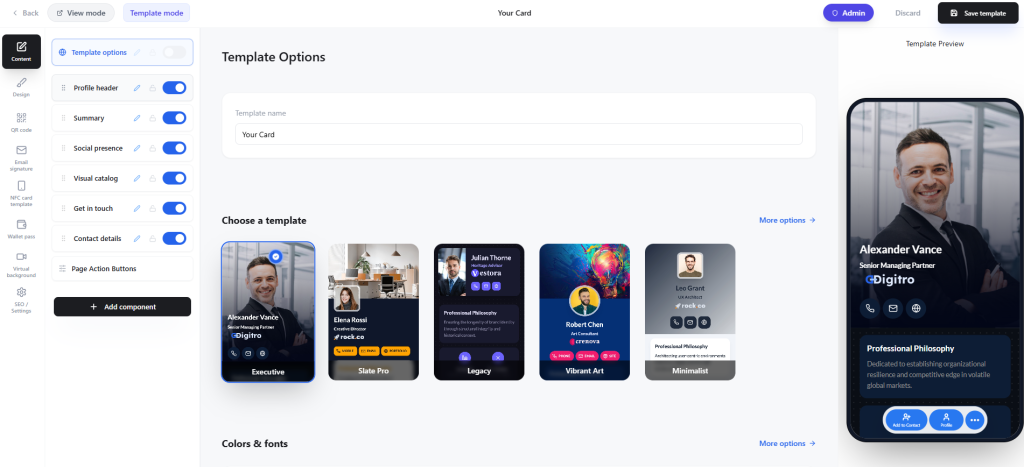
This helps companies control key details such as logos, brand colors, company links, legal links, card layout, and approved CTAs.
Employees get professional cards without having to start from scratch, while marketing and leadership maintain control over how the brand appears across every customer-facing profile.
Add multiple teams for seamless cross-team card management
Different teams need different card structures. Sales may need lead capture and calendar booking. Customer success may need support links and documentation. Procurement may need verified contact details and vendor communication links.
Digital Business Card PRO lets admins create multiple teams, each with its own design template and fields.
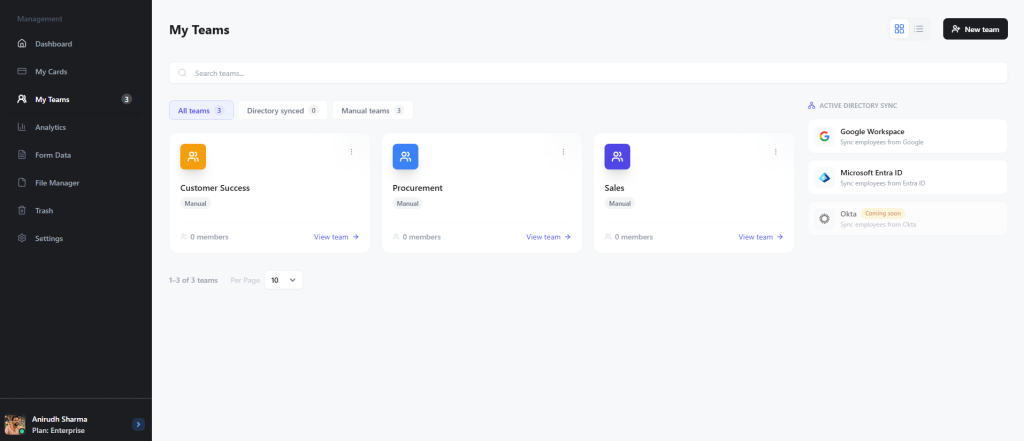
Every department gets the card structure that fits how they actually work, within a single managed system with full admin visibility.
Serve cards on your own branded domain with white labeling
For customer-facing teams, the card URL is part of the brand experience. A disconnected or generic URL can weaken trust, especially when employees represent different departments, brands, regions, or clients.
Digital Business Card PRO supports white-labeling with custom domains, allowing companies to serve digital business cards on their own branded domains.
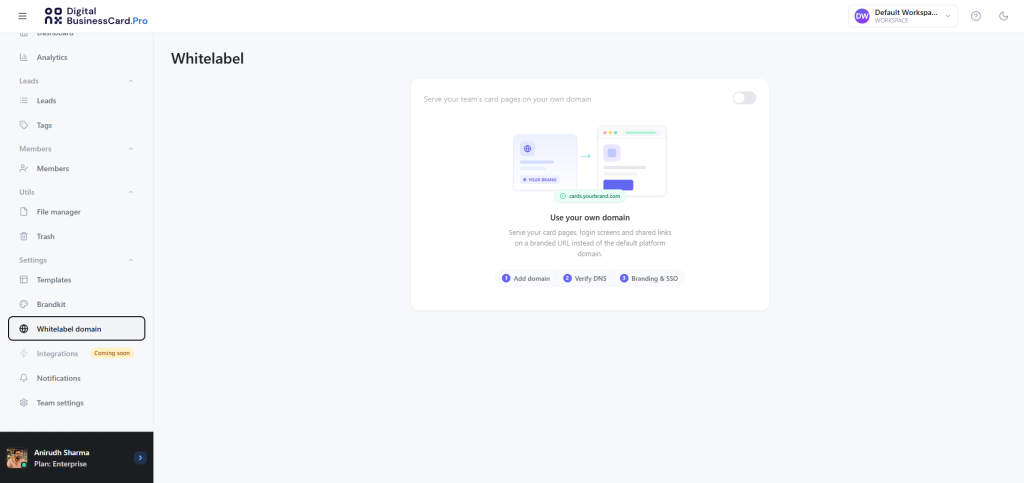
Additionally, you can add multiple custom domains and assign them to different teams.
Sales in North America can have a different branded card URL than the enterprise team in APAC, all managed from one platform.
View team-level analytics, leads, and performance
Enterprise teams need visibility into how their cards are being used.
Digital Business Card PRO provides team-level analytics, enabling leaders and admins to track performance for each team separately.
Sales leadership can monitor lead volume. Marketing can assess event performance. HR can track adoption across employee groups and identify where cards are not being used.
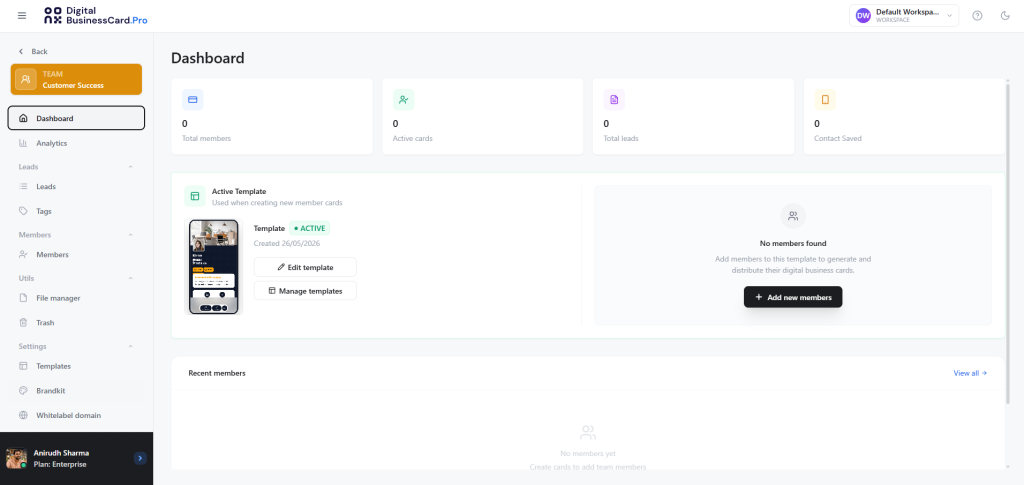
This moves card management from a one-time rollout task to an ongoing performance function.
Manage team-level assets with brand kits and folders
Different teams need different assets. Customer success may need help docs. Sales teams may need pitch decks.
Digital Business Card PRO includes a team-level file manager, so teams can store documents and multimedia assets within their team’s dashboard for easy access.
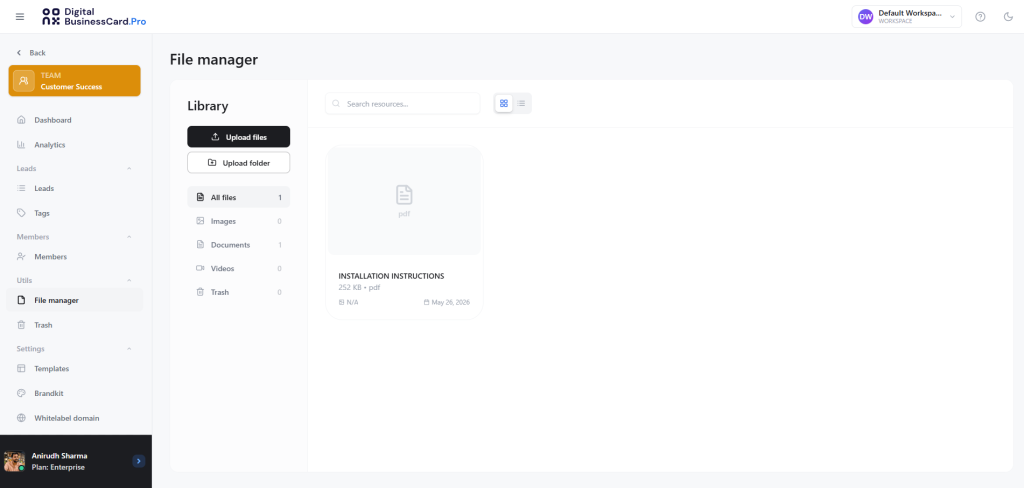
You also get team-level brand kits. Admins can store logos, colors, and visual assets separately for different teams, departments, brands, or clients.

This keeps approved assets organized and accessible without repeated uploading or version confusion.
Switch between workspaces for clean, effortless management
Sometimes, teams are not enough. Large companies and multi-brand organizations may need stronger separation between divisions, departments, clients, or locations.
Digital Business Card PRO lets users create and switch between separate workspaces. Each workspace creates a separate dashboard environment, each with its own teams, members, and cards.

For HR teams, this can help separate departments or regions. For country and global department heads, it supports multiple brands, divisions, or locations without cluttering a single dashboard.
This gives organizations a cleaner way to scale digital business card management without mixing unrelated teams, assets, and settings.
Manage subaccounts and roles with clear permissions
Digital Business Card PRO lets enterprises add users to a workspace as subaccounts and assign them specific roles. These roles define what each user can access and manage inside the workspace, so card management can be distributed without giving everyone full admin control.

Admins can choose a predefined role or create custom roles in the Roles section. Once a custom role is created, it can be assigned to subaccounts based on the user’s responsibility.
For example, a team manager can manage assigned teams, cards, leads, and analytics, while another custom role can be limited to specific permissions.
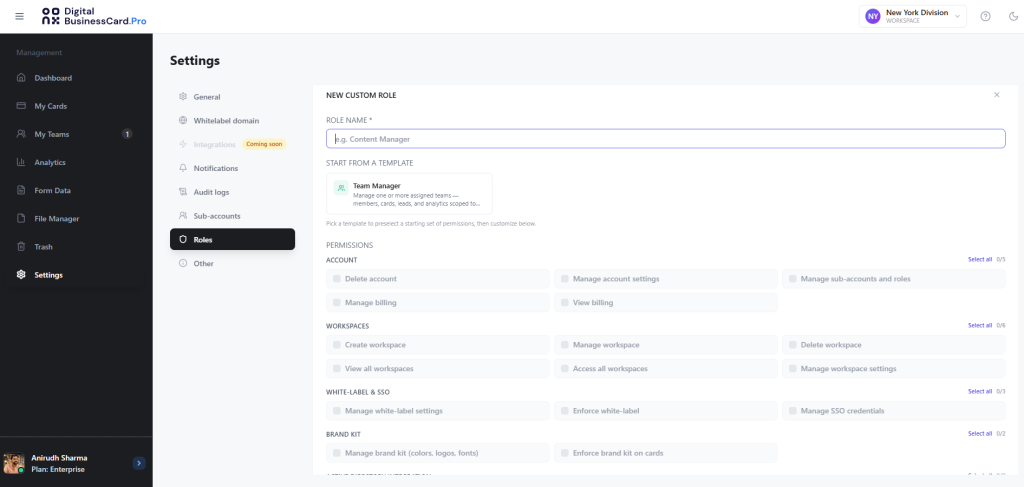
This gives enterprises a cleaner way to involve HR, marketing, sales managers, regional leads, or department owners in card management while keeping access controlled and structured.
Keep card and lead data protected with enterprise-grade security
Digital Business Card PRO is built with enterprise security needs in mind. It is GDPR compliant, uses strong encryption, and offers a robust Data Processing Agreement (DPA) to support responsible data handling.
This gives enterprise teams greater confidence in managing employee digital business cards, lead-capture data, custom domains, and team-level access across departments. It also helps IT, legal, and compliance teams evaluate the platform with clearer safeguards in place.
Best practices for creating and managing enterprise digital business cards
Managing digital business cards across a large organization needs more than a rollout plan. You need clear ownership, consistent branding, clean employee data, and a platform that supports ongoing changes without creating manual work.
Here are some proven tips and best practices for implementing digital business cards at scale.
1. Define card ownership early
Decide who owns digital business card management before rollout. HR may handle employee onboarding, marketing may control branding, sales may manage lead capture, and IT may oversee integrations. Clear ownership prevents confusion when cards need updates, approvals, or access changes.
2. Group users by team, role, or department
Avoid managing every employee card as a standalone profile. Group users by department, region, role, or function to make templates, fields, links, and permissions easier to manage. This also ensures each team gets a card structure that fits how they work.
3. Standardize the fields every card must include
Create a core structure for employee digital business cards. Define the required fields, including name, designation, company name, phone number, email, website, logo, and approved links. This keeps cards complete, searchable, and consistent across the organization.
4. Use locked templates to protect brand consistency
Give teams templates instead of asking employees to design their own cards. Lock important fields such as logos, colors, company links, legal links, and CTAs. This gives employees polished cards while keeping brand identity controlled across hundreds of customer-facing profiles.
5. Build a reliable process for keeping employee data current
Employee details change often, especially in large teams. Set a process for updating roles, departments, phone numbers, locations, and exits. Directory sync, CSV updates, or centralized admin control can reduce the number of outdated cards and prevent inactive employee profiles from remaining live.
6. Track adoption and performance by team
Digital business card management should not stop after creation. Review team-level analytics to see who is using their cards, which cards drive engagement, and where leads are coming from. These insights help improve adoption, follow-up, and team-specific card strategy.
7. Choose a platform built for enterprise management
A basic platform will not support enterprise needs for long. Choose a digital business card platform with team management, directory sync, templates, locked fields, workspaces, brand kits, custom domains, analytics, and centralized admin control. These capabilities make enterprise digital business cards easier to scale and govern.
Final thoughts: Enterprise digital business card management needs structure
Managing digital business cards at enterprise scale is not just about giving every employee a shareable profile. It is about keeping employee information accurate, brand identity consistent, team workflows organized, and customer-facing interactions measurable.
As teams grow, manual card creation and scattered profile management create unnecessary work for HR, marketing, sales, and operations. The better approach is to manage digital business cards through a centralized system built for teams, templates, domains, analytics, and ongoing updates.
Digital Business Card PRO gives enterprises that structure. It helps companies create, organize, and manage employees’ digital business cards across departments, regions, and business units without compromising branding or accuracy.
Frequently Asked Questions
How do we roll out digital business cards to hundreds of employees without creating extra work for HR?
The most efficient approach is directory sync. Digital Business Card PRO integrates directly with Google Workspace and Microsoft Entra ID, so cards are automatically created and deactivated as employees join, change roles, or leave. For companies not ready for directory sync, bulk creation via CSV or Excel upload handles large rollouts without manual, one-by-one setup.
How do we ensure employee cards stay on-brand when teams span multiple departments and regions?
Through locked templates. Admins set the design template and lock the fields that matter most: logos, brand colors, company links, legal disclaimers, and approved CTAs. Employees can fill in their personal details, but the brand-critical elements remain consistent across all cards, regardless of who creates them or where they are based.
What happens to an employee’s card when they leave the company?
With directory sync enabled, card deactivation happens automatically when an employee is removed from your identity provider. For companies managing exits manually, admins have centralized control to discontinue or update cards immediately. This prevents inactive cards with company branding, lead-capture forms, or custom domain URLs from remaining live after an employee has left.
Can different departments have different card structures within the same platform?
Yes. Digital Business Card PRO lets you create multiple teams, each with its own template, fields, and permissions. Sales can have lead capture and calendar booking. HR can have identity-focused cards. Leadership can have executive profiles. Every team gets the structure that fits how they work, all managed from a single admin dashboard.
How do we know if employees are actually using their cards?
Through team-level analytics built into the platform. Admins and team leaders can track card engagement, lead capture activity, and adoption rates by team. This helps you identify which groups are using their cards effectively, which teams need follow-up, and where card content may need updating to drive better results.
You may also like
Professional Email Signature Guide: What to Include and How to Create One
This guide discusses what a professional email signature is, what to include in it, how to create one, and how to use it with your digital card.
5 Best Event Lead Capture Tools in 2026
Event lead capture gets messy fast. Let’s look at the five best event lead capture tools, and how to choose the right one.
How Much Does a Digital Business Card Cost? (2026 Pricing Guide)
This guide helps you understand how much a digital business card costs and how much to invest based on your requirements.
How to Integrate Digital Business Card with Your HubSpot
Learn how to connect HubSpot with Digital Business Card PRO, map form fields, and automatically send digital business card form submissions to HubSpot.