Poor brand consistency costs mid-sized and large businesses more than $6 million in lost revenue annually.
That is a serious number for something many teams still treat as a design issue. Brand inconsistency does not only show up in major campaigns, websites, or sales decks. It also shows up in everyday touchpoints such as employees’ physical and digital business cards.
When every employee shares a different version of your company’s identity, the brand starts to feel fragmented. One person may use an outdated logo. Another may share an incomplete profile. A sales rep may add off-brand messaging. A regional team may use a different design altogether.
For marketing teams, this poses a clear challenge: how do you give every employee a professional card while maintaining brand control?
That is where branded digital business cards for marketing teams make a difference. They give marketing leaders a centralized way to control design, messaging, employee information, and brand consistency across every department.
Let’s discuss how marketing teams can use centralized business card management to keep every employee business card on-brand, accurate, and measurable.
Key Takeaways:
- Brand inconsistency can cost enterprises millions in lost revenue.
- Employee business cards are everyday brand touchpoints.
- Locked templates keep logos, colors, layouts, and CTAs consistent.
- Directory integration keeps employee card details accurate.
- Digital Business Card Pro centralizes card management for teams.
- The problem with traditional business card management
- Why marketing teams need centralized business card management
- What “on-brand” means for employee digital business cards
- The key pillars of an on-brand digital business card system
- Create on-brand digital business cards with DigitalBusinessCard.Pro
- Where Digital Business Card.Pro fits in
- Conclusion
- Frequently Asked Questions
The problem with traditional business card management
Most companies still manage business cards in ways that do not match how modern teams work.
Marketing creates a design. HR or admin teams collect employee details. A vendor prints the cards. Employees use them until details change. When someone gets promoted, changes departments, updates their phone number, or moves locations, the process starts again.
This creates several problems:
- Printed cards become outdated quickly
- Marketing has limited control after cards are distributed
- Employees may create their own digital alternatives
- Teams use different designs across offices or departments
- Updating cards takes time and coordination
- There is no visibility into card engagement or lead capture
For small teams, this may feel manageable. For larger organizations, it becomes slow, inconsistent, and difficult to govern.
The real issue is not the card itself. It is the lack of a centralized system. When every update depends on manual coordination, brand consistency becomes harder to maintain with each new hire, office, department, or campaign.
Why marketing teams need centralized business card management
Centralized business card management gives marketing teams a single place to create, control, update, and govern employees’ digital business cards.
Instead of having every employee manage their own card design or rely on repeated manual requests, marketing can define the approved brand system once and roll it out across the organization.
This gives marketing control over:
- Brand templates
- Logos and visual assets
- Colors, typography, and layout
- Approved profile fields
- Custom domains
- Team or department-level variations
- Role-based access
- Updates across employee cards
This is why branded digital business cards become more than a design upgrade for marketing teams. They give marketing a scalable system for brand governance, employee enablement, and consistent external representation.
For marketing leaders, this shift matters because it moves business card management from a reactive task to a controlled brand process. You are no longer fixing issues after they appear. You are preventing inconsistency before employees share anything externally.
What “on-brand” means for employee digital business cards
An on-brand employee digital business card is not just a card with the right logo. It should reflect the company’s brand standards, communication style, and business goals.
That matters because trust is shaped by how consistently and authentically a brand shows up. A report found that 73% of people say their trust in a brand would increase if it authentically reflected today’s culture. For marketing teams, this reinforces an important point: every branded touchpoint should feel current, credible, and aligned with how the company wants to be seen.
For marketing teams, an on-brand digital business card should include the following elements.
1. Consistent visual identity
Every card should use approved brand colors, logos, fonts, spacing, and design hierarchy. Employees should not need to guess what looks right.
A consistent visual identity makes employee cards feel like part of the same company system, whether they are shared by a sales rep, recruiter, executive, consultant, or customer success manager.
2. Approved messaging
The profile headline, company description, CTA, and supporting text should match the company’s positioning. This is especially important for sales, business development, recruiting, and customer-facing teams.
Without messaging control, employees may describe the company in different ways. One may use outdated positioning. Another may oversimplify the offer. Another may add claims that marketing has not approved.
3. Accurate employee information
Names, titles, phone numbers, emails, departments, locations, and social links should stay up to date. Outdated employee information weakens trust.
Accuracy matters because a business card is often used at the point of intent. If a prospect tries to call an old number, email the wrong address, or click an outdated link, the brand experience suffers.
4. Branded sharing experience
The card link should feel like part of your company’s digital ecosystem. Custom domains and branded profile URLs help create a more credible experience.
A branded URL also reassures recipients that the card belongs to the company. This is especially useful for enterprises, agencies, consultancies, financial services firms, real estate teams, and other businesses where trust matters from the first interaction.
4. Controlled flexibility
Different teams may need different fields. Sales may need lead capture forms. HR may need recruiting links. Leadership may need calendar booking. Marketing should be able to allow flexibility without losing brand control.
That is the core value of branded digital business cards for marketing teams. They allow employees to share relevant information while keeping the overall brand system consistent.
The key pillars of an on-brand digital business card system
Branded digital business cards for marketing teams work best when they are managed as a system. Marketing needs brand control, team-level flexibility, accurate employee data, branded sharing, lead capture, and performance visibility.
These pillars help every employee card stay consistent, useful, and measurable as the organization grows.
1. Locked templates for brand control
Locked templates allow marketing to create approved card designs and prevent employees from changing key brand elements, such as logos, colors, layouts, and messaging.
Employees can update approved personal details, while marketing maintains the overall brand system. This prevents brand drift without creating more manual review work.
2. Team-level controls for departments and locations
Different teams need different card experiences. Sales may need lead capture. HR may need recruiting links. Regional teams may need local contact details.
Team-level controls let marketing adapt cards by department, location, role, or campaign while keeping the core brand consistent.
3. Directory integration for accurate employee information
Brand consistency also depends on accurate employee data. Manual updates create delays, errors, and outdated profiles. A report found that only 31% of marketers are fully satisfied with their ability to unify customer data sources.
Directory integration connects employee digital business cards with systems such as Azure Entra ID or Google Workspace, helping cards stay aligned with the organization’s source of truth.
4. Custom domains for branded credibility
A digital business card should feel like part of your company’s brand, not a third-party profile.
Custom domains let employees share cards on a company-controlled domain. This strengthens trust, improves brand recall, and makes every employee profile feel like an official brand touchpoint.
5. Lead capture for measurable engagement
Employee digital business cards can do more than share contact details. They can capture leads from events, meetings, recruiting conversations, and sales interactions.
Instead of leads staying scattered across inboxes, notes, or personal follow-ups, marketing and sales teams get a more consistent way to capture and route interest.
6. Analytics for visibility and optimization
Paper business cards give marketing no performance data. Digital business card analytics show how employees, teams, events, and campaigns are driving engagement.
Marketing teams can track profile views, lead capture, CTA performance, team adoption, and event activity. This helps them improve usage, standardize what works, and connect employee networking to measurable outcomes.
Create on-brand digital business cards with DigitalBusinessCard.Pro
Creating branded digital business cards for marketing teams should not require repeated design reviews, manual updates, or one-off employee requests. With DigitalBusinessCard.Pro, you can create a team, apply a shared template, lock important fields, add members, and distribute cards from one place.
Here is a simple workflow marketing teams can follow.
1. Create a team
Go to My Teams and create a new team for your marketing department, campaign group, regional office, or client-facing team.
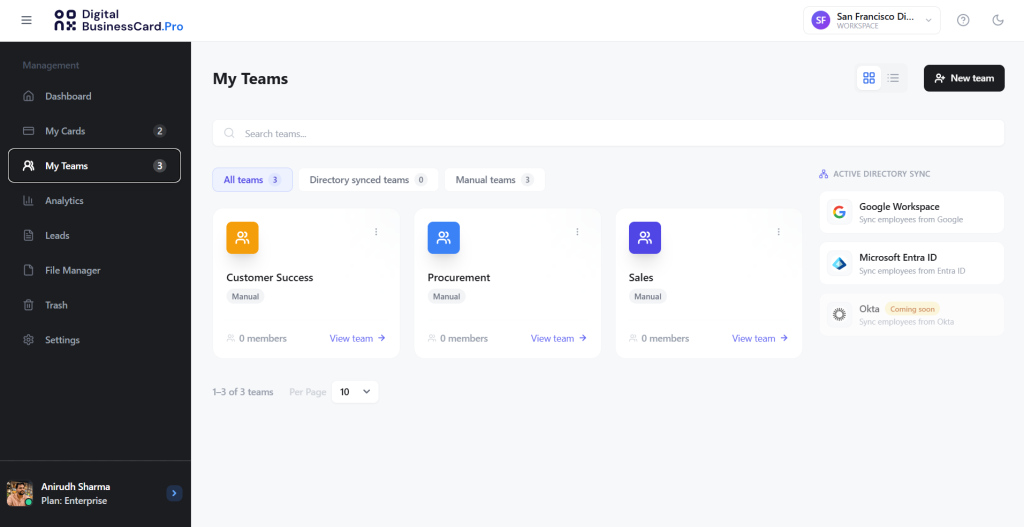
You can create a team manually, upload member details through a CSV file, or use directory integration for larger teams. The steps below focus on manual and CSV-based setup.
2. Choose a template
Next, select the card template you want every team member to use.
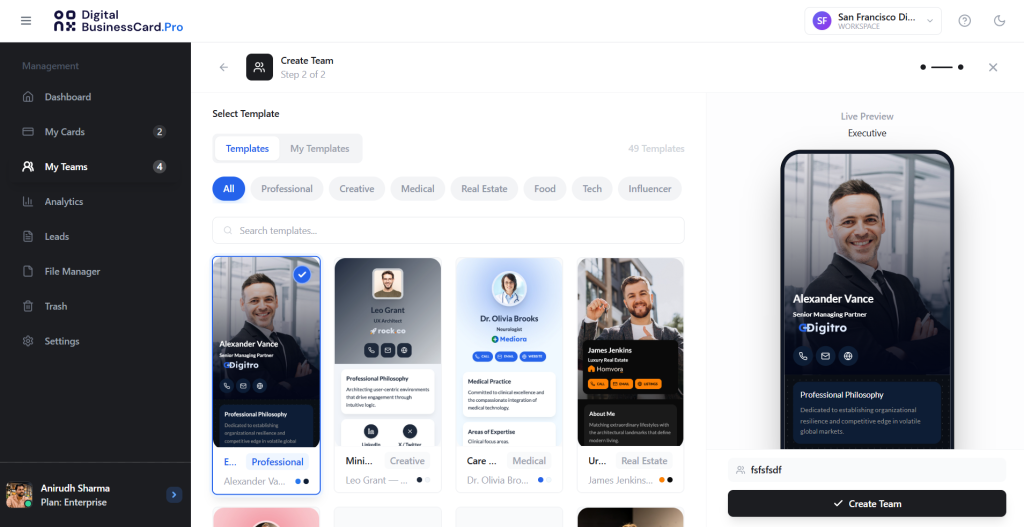
This template will define the structure and visual direction for all digital business cards created within the team. For marketing teams, this helps keep employee cards aligned with your brand colors, layout, logo usage, and profile format.
3. Lock the fields and save the template
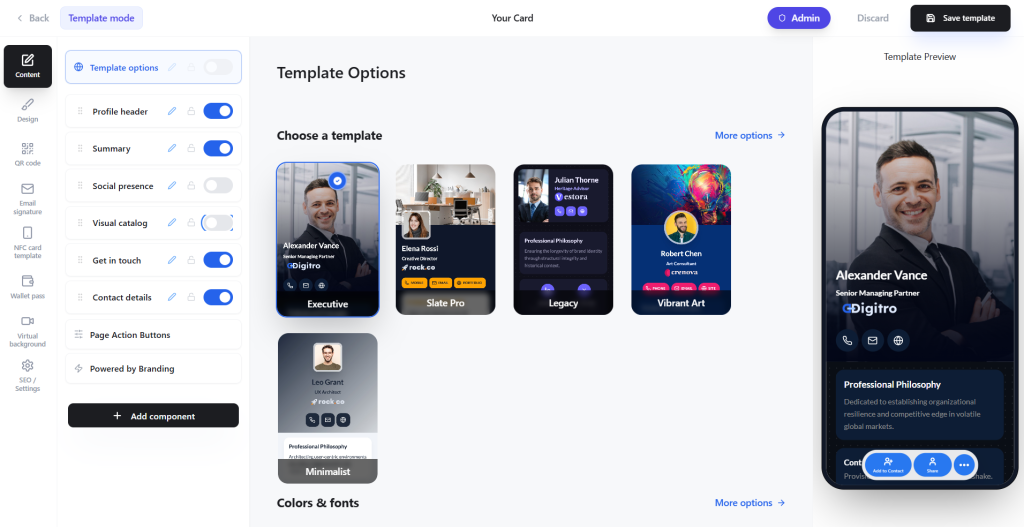
Choose the information fields every card in the team should include. For most marketing teams, useful fields include:
- Employee name
- Job title
- Company name and logo
- Phone number and email address
- Website and social links
- Company description or approved bio
- Contact form or lead capture form
- CTA button
Once the required fields are selected, lock the fields that should remain consistent across all team cards. This prevents employees from accidentally changing important brand elements or removing required information.
After reviewing the setup, save the template.
4. Add members to the team
After saving the template, add team members.
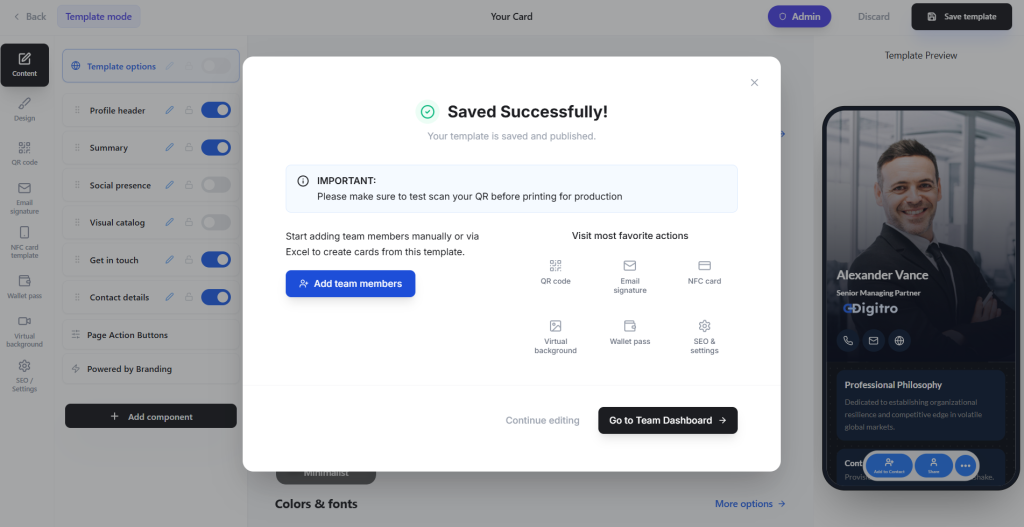
You can add members manually, one by one, or upload a CSV file containing all member details. CSV upload is useful when you need to create digital business cards for employees across a larger marketing team, an event team, a sales enablement group, or a regional department.
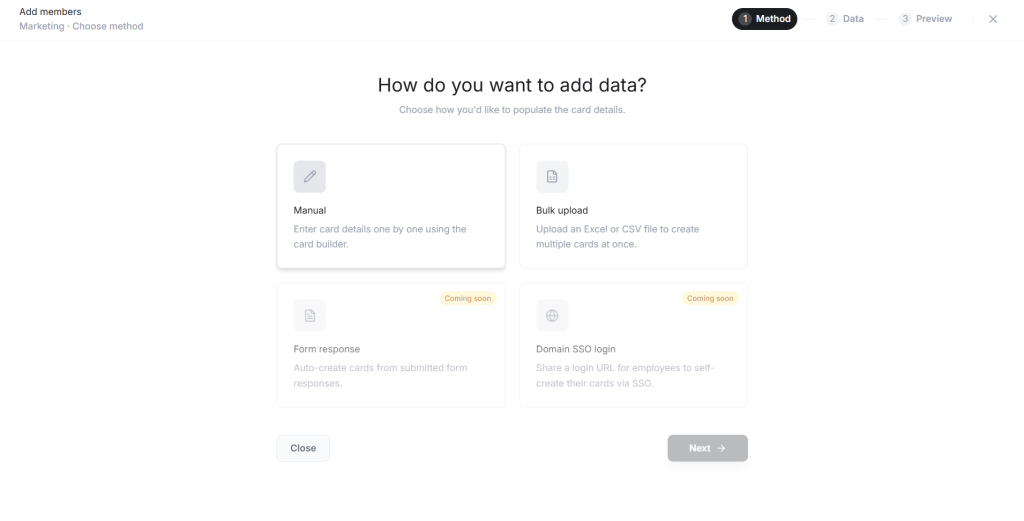
Once the members are added, DigitalBusinessCard.Pro creates cards based on the selected team template.
5. Share access and distribute cards
When the team member cards are ready, share them with the respective employees via email.
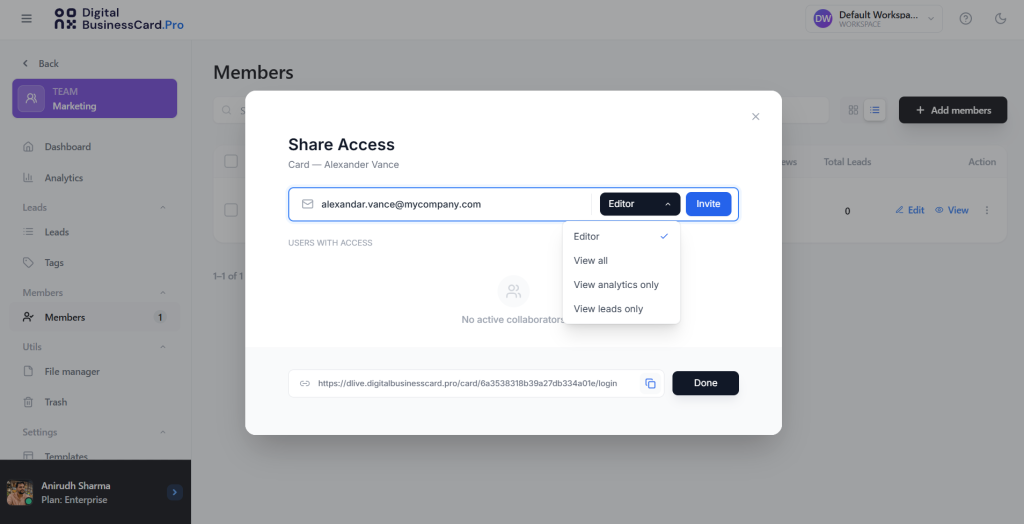
You can decide whether each member should have edit access or view-only access. For stricter brand control, view-only access works well. If employees need to update approved personal details, limited edit access may be more practical.
Once shared, your marketing team can start using their on-brand digital business cards in meetings, events, email signatures, LinkedIn conversations, proposals, and client interactions.
That’s it. Your marketing team is ready to represent the brand with confidence, share consistent employee profiles, and capture valuable leads from every important interaction.
Where Digital Business Card.Pro fits in
Digital Business Card Pro is built for organizations that have outgrown individual digital card tools, scattered employee profiles, and manual business card management.
For enterprises and growing teams, business cards are not just contact-sharing assets. They are brand touchpoints, lead-capture tools, employee identity profiles, and customer-facing assets that require governance. If every employee creates or manages their own card, marketing loses control, sales loses visibility, and the organization loses consistency.
Digital Business Card Pro solves this with centralized business card management built for teams.
With Digital Business Card Pro, your organization can:
- Create approved, branded templates: Give every employee a professional digital business card that adheres to your brand colors, layout, logo usage, and messaging standards.
- Lock important fields: Prevent employees from changing brand-critical elements such as logos, colors, company descriptions, CTAs, and required contact fields.
- Manage employees’ digital business cards centrally: Create, update, organize, and govern cards from a single platform instead of handling scattered requests across teams.
- Organize teams into workspaces: Manage different departments, regions, business units, or client teams with the right structure, branding, and permissions.
- Deploy cards in bulk: Create employee digital business cards at scale via CSV upload or directory integration, rather than building cards one by one.
- Use directory integration: Keep employee information aligned with systems such as Azure Entra ID or Google Workspace, so cards stay accurate as teams change.
- Share cards on custom domains: Let employees use branded profile links that feel official, credible, and connected to your company.
- Control access and permissions: Decide who can view, edit, manage, or distribute cards so brand governance does not depend on manual oversight.
- Capture leads from every card: Add contact forms and lead capture options so employees can collect inquiries from events, meetings, sales conversations, and networking interactions.
- Connect lead capture to sales workflows: Route captured leads into systems and follow-up processes so valuable conversations do not stay buried in personal inboxes or notes.
- Measure engagement and performance: Track views, clicks, leads, employee activity, team performance, and campaign impact across the organization.
- Support team-wide brand consistency: Keep every employee card aligned while still allowing controlled flexibility for different roles, teams, and locations.
Digital Business Card Pro brings together everything organizations need to manage employee digital business cards at scale: from brand governance and centralized administration to lead capture and performance tracking.
Instead of relying on disconnected tools and manual processes, teams get a single platform that keeps every card accurate, on-brand, and measurable, helping turn everyday networking into a consistent and trackable business growth channel.
Conclusion
Every employee business card is a brand moment. When cards are inconsistent, outdated, or unmanaged, marketing loses control over a touchpoint that prospects, partners, and customers still notice.
The solution is not more manual review. It is centralized business card management.
With employee digital business cards, locked templates, custom domains, directory integration, lead capture, analytics, and secure governance, marketing teams can keep every employee on-brand while giving teams a faster, smarter way to connect.
For growing organizations, branded digital business cards for marketing teams are no longer just a digital replacement for paper cards. They are a practical system for brand control, employee enablement, and measurable business networking.
Frequently Asked Questions
What are branded digital business cards for marketing teams?
Branded digital business cards for marketing teams are employee digital cards managed under one approved brand system. Marketing teams can control templates, logos, colors, messaging, custom domains, and required fields so every employee card stays consistent and professional.
Why should marketing teams manage employee business cards centrally?
Marketing teams should manage employee business cards centrally because every card is a brand touchpoint. Centralized business card management helps prevent outdated logos, inconsistent designs, incorrect contact details, and off-brand messaging across employees, departments, and locations.
How do locked templates help keep business cards on-brand?
Locked templates let marketing teams define which card elements employees can and cannot change. For example, marketing can lock logos, colors, layouts, company descriptions, CTA buttons, and required fields while allowing employees to update approved personal details.
Can branded digital business cards help with lead capture?
Yes. Branded digital business cards can include contact forms and lead capture options so employees can collect inquiries from events, meetings, sales conversations, and networking interactions. This helps marketing and sales teams capture interest instead of losing leads in personal notes or inboxes.
What should marketing teams look for in a digital business card platform?
Marketing teams should look for centralized card management, locked templates, bulk card creation, team workspaces, custom domains, directory integration, access controls, lead capture, CRM integration, and analytics. These features help teams manage employee digital business cards at scale while protecting brand consistency.
You may also like
Brand Consistency Across Teams: Standardize Customer-Facing Touchpoints and Measure Results
Brand consistency cannot scale through guidelines alone. Here’s how to build a system that ensures brand consistency across teams.
How to Build a Personal Brand at Work Without Sounding Like Everyone Else
Learn how to build a personal brand at work using tactics that work inside a team: 1:1s, credit-sharing, and internal visibility.
Essential Tools for Field Sales Reps: What to Look for Before Choosing One
A practical framework for evaluating essential tools for field sales reps and the mistakes that break rep consistency in the field.
18 Business Networking Strategies for Professionals and Teams to Build Real Connections
Let’s look at the best business networking strategies for professionals and teams to build real connections.