Job fairs and campus hiring events are still high-value recruiting channels for large organizations. According to NACE’s 2024-25 Career Services Benchmarks survey, in-person career fairs drew nearly 5x more students and about 3.5x more employers than virtual fairs on average.
That scale creates a real challenge for enterprise recruiting teams. Candidate interest often gets scattered across resumes, LinkedIn requests, email threads, paper forms, and individual recruiter follow-ups. Candidates may forget whom they spoke to, while talent acquisition leaders may struggle to see which events, recruiters, or campuses generated meaningful engagement.
Digital business cards for recruiting teams give organizations a more structured way to manage these interactions. Recruiters can use branded digital profiles to share role links, collect candidate interest, route follow-ups, and maintain consistent employer branding across every event.
Here’s how recruiting teams can use digital business cards before, during, and after hiring events to create a more branded, organized, and measurable candidate engagement process.
Key Takeaways:
- Digital business cards help recruiting teams capture candidate interest before it fades.
- Branded recruiter profiles create a consistent employer brand at every hiring event.
- Candidate forms turn booth conversations into structured, follow-up-ready data.
- Event-specific cards guide candidates to the right roles, programs, and next steps.
- The real challenge: Managing candidate interest at scale
- How to use digital business cards as branded recruiter profiles
- How to set up cards for your recruiting team with DigitalBusinessCard.Pro
- Why DigitalBusinessCard.Pro for recruiting team digital business cards?
- Best practices for using digital business cards at hiring events
- Conclusion
- Frequently asked questions
The real challenge: Managing candidate interest at scale
For large recruiting teams, job fairs and campus hiring events are rarely quiet. The booth gets traffic. Students ask questions. Recruiters explain open roles, internship programs, graduate hiring tracks, company culture, and application steps. On the surface, the event feels successful because the team is having conversations all day.
The problem is what happens to those conversations after the event.
Candidate interest often gets spread across resumes, LinkedIn requests, email threads, notes, paper forms, QR scans, and individual recruiter follow-ups.
One recruiter may ask students to apply through the careers page.
Another may collect resumes manually.
Another may share a LinkedIn profile or personal email.
By the end of the day, the recruiting team has activity, but not always a clean system for turning that activity into organized candidate engagement.
This creates a visibility problem for talent acquisition leaders. They may know the event was busy, but not which recruiters had the most meaningful conversations, which campuses generated stronger interest, or which role categories attracted the right candidates.
For enterprise recruiting teams, the goal is not just to replace paper business cards. It is to create a standardized candidate engagement flow across every recruiter, every booth, and every hiring event.
How to use digital business cards as branded recruiter profiles
At a hiring event, a recruiter’s digital business card should do more than share contact details. It should act as a branded recruiter profile that gives candidates one clear place to explore roles, save details, submit interest, and follow the right next step.
That matters because candidates evaluate your employer brand before they apply. Glassdoor reports that 83% of job seekers are likely to research company reviews and ratings when deciding where to apply.
A recruiter’s card helps enterprise teams guide that research with approved role links, hiring resources, culture content, and application paths.
For large recruiting teams, this creates consistency. Every recruiter can use a company-approved profile with the right logo, colors, messaging, links, and hiring resources.
Capture candidate interest while the conversation is still fresh
At job fairs and campus hiring events, timing matters. Once candidates leave the booth, their interest can fade quickly.
Instead of ending with “apply on our careers page,” recruiters can guide candidates to a short interest form from their digital business card. The form can collect name, email, phone number, college, graduation year, preferred role, internship or full-time interest, LinkedIn profile, resume link, and consent for follow-up.
This turns a booth conversation into structured candidate data and helps teams segment candidates by role, campus, hiring track, or level of interest.
Keep every recruiter on brand
At enterprise hiring events, candidates may speak with recruiters, hiring managers, employee ambassadors, and business leaders. Each person shapes the candidate’s first impression.
If every recruiter shares different links, outdated brochures, personal contact pages, or off-brand materials, the experience feels fragmented. Centralized digital business card management helps recruiting teams control logos, templates, recruiter details, career links, event resources, candidate forms, permissions, and profile updates from one place.
This gives talent acquisition and employer branding teams a single source of truth across every recruiter and event.
Use different digital business cards for different hiring events
One generic recruiter profile is not enough for every hiring event. Campus hiring drives, MBA events, engineering job fairs, diversity hiring programs, and lateral hiring events often need different candidate journeys.
Digital business cards for recruiting teams can be customized for each context. A campus card can share internships and student resources. An engineering card can link to technical roles and portfolio forms. An MBA card can highlight leadership programs. A diversity hiring card can share inclusion initiatives and mentorship programs.
Each card guides candidates to the most relevant next step while keeping the employer brand consistent.
Make post-event follow-up faster and more organized
A strong candidate conversation can lose momentum if follow-up is delayed or left to individual recruiters.
Digital business cards help because candidate information is captured digitally from the start. Once a candidate submits interest, the team can segment candidates, share details with the right recruiter, send relevant role links, route candidates to the right application page, and keep follow-up messaging consistent.
Instead of sorting through scattered notes, recruiters can start with structured candidate data.
Measure which events and recruiters drive candidate engagement
For enterprise recruiting teams, a busy booth is not enough. Talent acquisition leaders need to know which events, recruiters, and campaigns created real engagement.
Digital business cards for recruiting teams make hiring events more measurable. Teams can track scans, clicks, form submissions, recruiter engagement, role-page clicks, campus interest, and event-specific card performance.
This helps recruiting leaders compare campuses, improve booth strategy, refine follow-up, and understand where the strongest talent interest is coming from.
Put digital business cards everywhere candidates interact with your team
A digital business card does not have to be shared only from a recruiter’s phone. At high-volume events, recruiting teams should make it easy to scan at every candidate touchpoint.
Place QR codes on recruiter badges, booth standees, brochures, presentation slides, booth screens, LinkedIn posts, email campaigns, follow-up emails, and campus-specific hiring pages.
This makes digital business cards part of the full event experience, not just a contact-sharing tool.
Create a smoother candidate experience from first scan to follow-up
A strong hiring event experience depends on clear next steps. After one scan, candidates should know where to apply, whom to contact, and how to express interest.
A digital business card gives them one branded profile with recruiter details, role links, internship information, culture content, application steps, and candidate interest forms.
For enterprise recruiting teams, every scan should lead to the right information, the right next step, and the same professional brand experience across every recruiter and event.
How to set up cards for your recruiting team with DigitalBusinessCard.Pro
Follow these steps to create digital business cards for your entire recruiting team in a few minutes.
1. Create a team
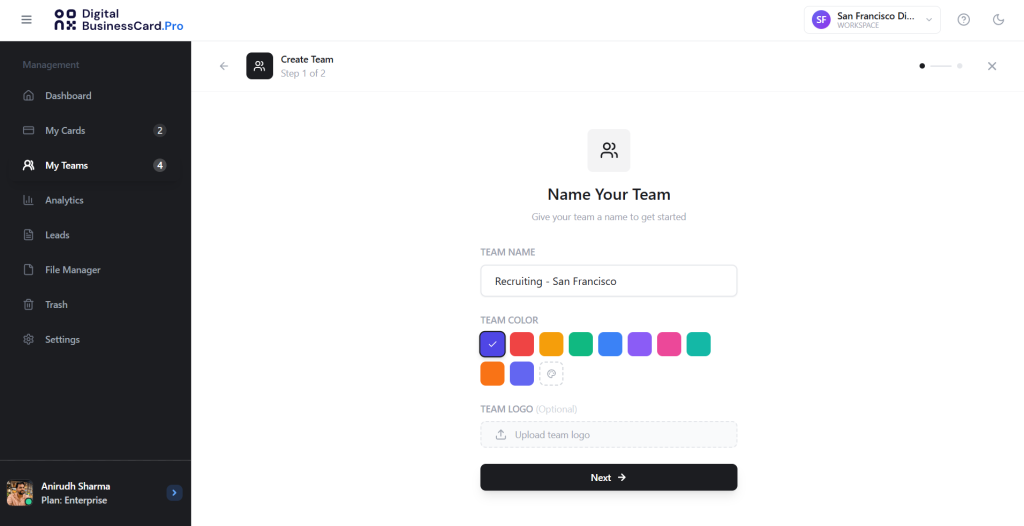
Log in to your DigitalBusinessCard.Pro account and go to My Teams. Click “New Team.” Name your team, upload a logo, and select a color.
Let’s name it Recruiting – San Francisco.
2. Set a template
Next, select a template for your team’s digital business card. All the cards in your team will follow the same template, ensuring design consistency across all members.
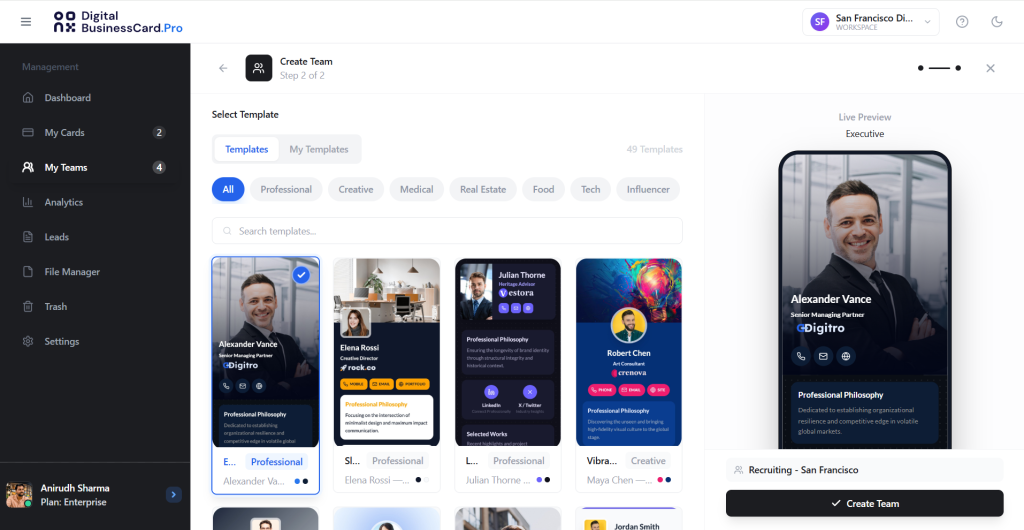
DigitalBusinessCard.Pro offers dozens of industry-specific templates that transform your digital cards from mere contact cards to impressive branded profiles.
3. Select the card fields
After choosing your template, set the fields you want each team member to have.
For instance, recruiting teams might need their name, designation, and contact information to introduce themselves, links to job descriptions and company information, and a form to capture candidate details.
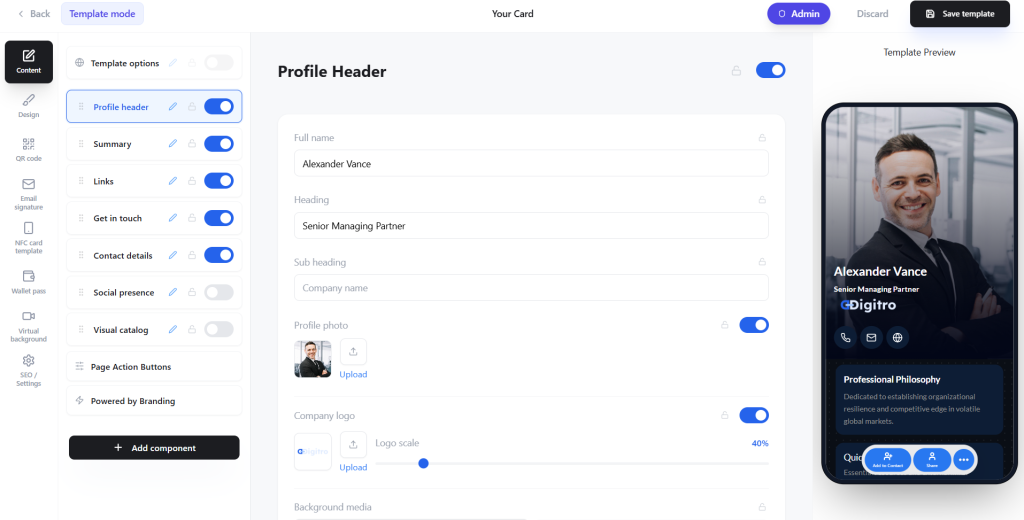
You can enable and disable fields in each section using the toggle.
You can also lock certain fields by enabling the lock icon beside the toggle button. Fields like company name, company logo, and links can be locked to ensure consistent branding and information sharing across the team.
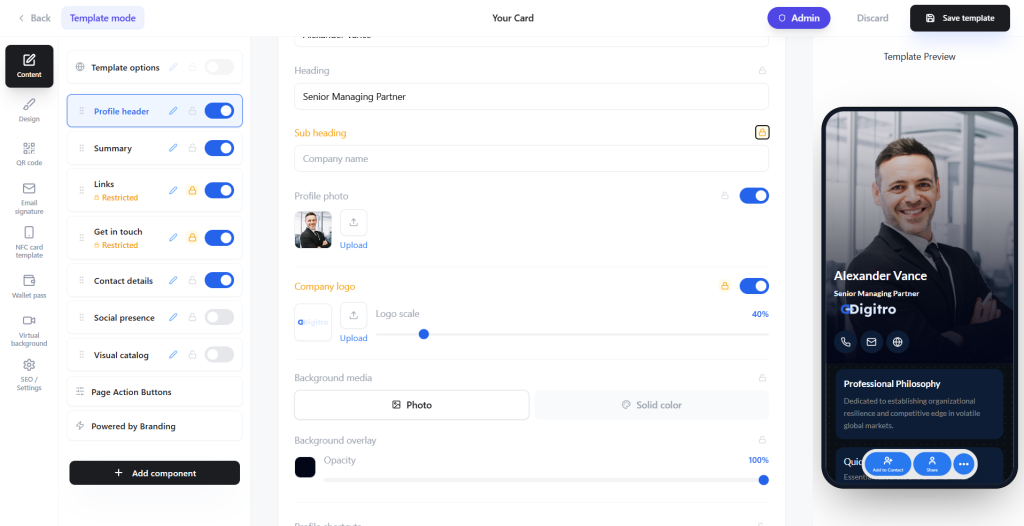
Once done, save the template and go to the team dashboard.
4. Add team members
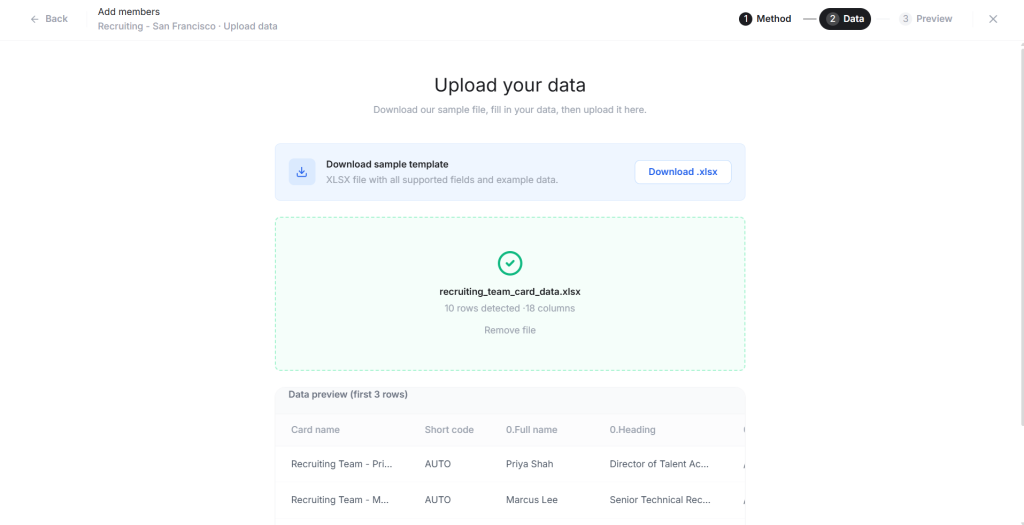
Now, click Add members, then upload a spreadsheet or CSV file containing your team members’ details. Then, map the spreadsheet columns to the card template fields.
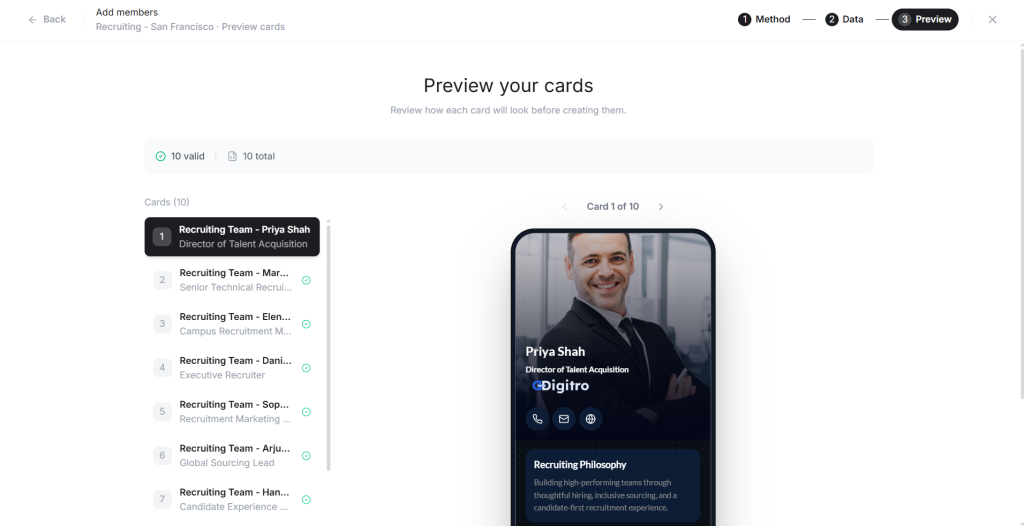
You’ll see a preview of the cards that will be created. Look at the card preview, and if you’re satisfied, create the cards.
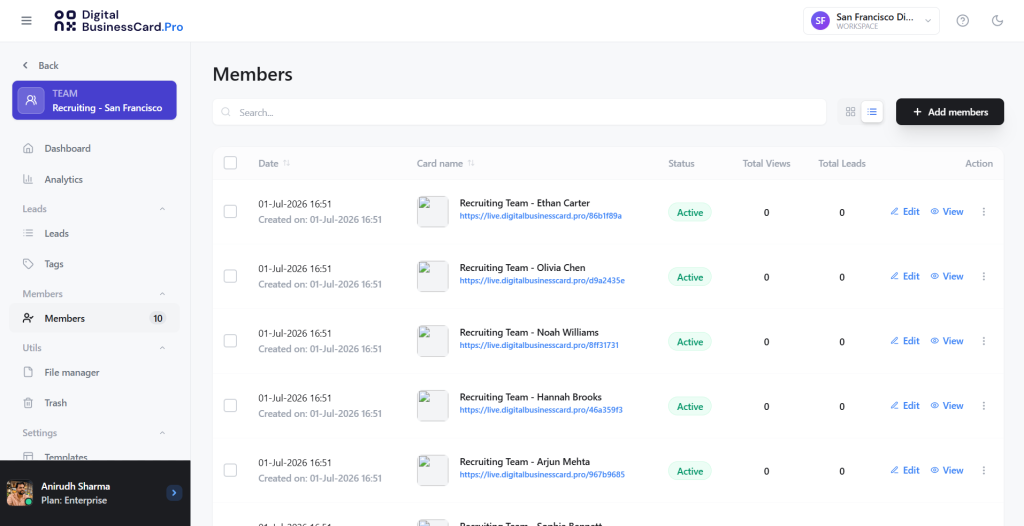
4. Share card access with the team members
You’ll see all your team’s cards in the Members section.
Now, go to My Teams, select the team you just created, then click Share access. Choose the Access Permission to “Editor” and enable the “Primary email in the card profile” in the Recipient source.
Save these changes. Each member will now receive their blank cards, in which they can update their information and upload their profile images.
Also read: How Enterprises Can Manage Hundreds of Digital Business Cards Across Multiple Teams
Why DigitalBusinessCard.Pro for recruiting team digital business cards?
For enterprise recruiting teams, the value is not just having a digital business card. The value is having one centralized platform where the organization can create, manage, update, and measure every recruiter profile at scale.
DigitalBusinessCard.Pro gives large recruiting teams the control they need to manage digital business cards across recruiters, hiring managers, campus ambassadors, employer branding teams, and regional hiring teams.
With DigitalBusinessCard.Pro, recruiting teams can:
- Create branded digital business cards for every recruiter and hiring team member
- Maintain consistent company logos, colors, templates, and employer branding
- Bulk create digital business cards for large recruiting teams
- Manage recruiter profiles centrally from an admin dashboard
- Add candidate interest forms to capture event leads directly from each card
- Share open roles, campus hiring pages, internship programs, brochures, videos, and application links
- Create event-specific cards for different campuses, job fairs, roles, or hiring campaigns
- Track scans, clicks, form submissions, and engagement across recruiters and events
- Use custom domains or white labeling to keep the experience aligned with the company brand
- Support team-level management, permissions, and profile updates
This helps enterprise recruiting teams move beyond individual contact sharing. Instead, DigitalBusinessCard.Pro turns recruiter profiles into a governed system for employer branding, candidate capture, event engagement, and post-event visibility.
For talent acquisition leaders, that means better control over how the company appears at hiring events. For recruiters, it means fewer manual steps and cleaner candidate interactions. For candidates, it creates a clearer, more professional path from first conversation to application.
Best practices for using digital business cards at hiring events
Digital business cards for recruiting teams work best when they are part of the event strategy, not just a replacement for paper cards. Before every job fair or campus hiring event, teams should decide what the card needs to help candidates do next.
- Keep each card focused on the event’s hiring goal.
A campus hiring card should not look the same as a lateral hiring card. Match the links, resources, and candidate form fields to the event’s purpose. - Add a candidate interest form, not just contact details.
Sharing recruiter information is useful, but capturing candidate interest is more valuable. Add a short form so candidates can submit their details while the conversation is still fresh. - Use event-specific links for roles and applications.
Avoid sending every candidate to a generic careers page. Link them to the most relevant roles, internship programs, graduate tracks, or department-specific opportunities. - Make QR codes visible across the event space.
Place digital business card QR codes on badges, booth standees, brochures, presentation slides, and tabletop displays. Candidates should not have to wait for a recruiter to manually share the card. - Keep branding consistent across every recruiter profile.
Use approved logos, colors, templates, and messaging. A consistent recruiter profile helps candidates recognize the company and trust the hiring experience. - Train recruiters on when to share the card.
Recruiters should introduce the card naturally during the conversation, not only at the end. For example, they can share it when discussing roles, application steps, or follow-up. - Create separate cards for different campuses or hiring tracks.
Large recruiting teams may need different cards for engineering students, MBA candidates, interns, experienced professionals, or diversity hiring programs. This keeps the candidate journey relevant. - Update role links before every event.
Outdated links create a poor candidate experience. Review open roles, application pages, brochures, and event resources before the recruiting team arrives at the venue. - Review scans, clicks, and form submissions after the event.
Digital business cards can show which events, recruiters, and resources generated engagement. Use that data to improve future campus hiring and job fair strategy.
Conclusion
Job fairs and campus hiring events move fast, but enterprise recruiting teams cannot afford to let candidate interest stay scattered. Every conversation should lead to a clear next step. Every recruiter should represent the same employer brand. Every event should give talent acquisition leaders better visibility into what worked.
Digital business cards for recruiting teams help make that possible. They turn recruiter profiles into branded, trackable, and action-ready candidate touchpoints. Candidates can scan, save details, explore relevant roles, submit interest, and follow the right application path. Recruiters can capture cleaner candidate data, follow up faster, and keep engagement organized after the event.
For large companies, this is where digital business cards become more than a networking tool. They support a more consistent, measurable, and scalable hiring event strategy across recruiters, campuses, roles, and campaigns.
With DigitalBusinessCard.Pro, enterprise recruiting teams can centrally manage branded recruiter profiles, capture candidate interest, track engagement, and create a smoother candidate journey from first scan to follow-up.
Frequently asked questions
Why should recruiting teams use digital business cards at job fairs?
Recruiting teams can use digital business cards to share recruiter details, open roles, application links, campus hiring pages, and candidate interest forms from one branded profile. This helps candidates take action faster and gives recruiters a more organized way to capture and follow up with candidate interest after the event.
How do digital business cards help capture candidate interest?
Digital business cards can include candidate interest forms where students or job seekers submit their name, email, phone number, college, graduation year, preferred role, resume link, and consent for follow-up. This turns quick booth conversations into structured candidate data instead of relying on paper forms, notes, or memory.
Can large recruiting teams manage multiple recruiter cards centrally?
Yes. With a centralized digital business card management platform like DigitalBusinessCard.Pro, enterprise recruiting teams can manage recruiter profiles, branding, templates, links, forms, permissions, and updates from one place. This helps keep every recruiter on brand across job fairs, campus drives, and hiring campaigns.
Can recruiting teams create different digital business cards for different events?
Yes. Recruiting teams can create event-specific digital business cards for campus hiring, engineering job fairs, MBA events, diversity hiring programs, lateral hiring drives, or regional recruitment campaigns. Each card can include the most relevant roles, application links, brochures, videos, and candidate forms for that event.
How do digital business cards improve post-event follow-up?
Digital business cards help recruiting teams collect candidate information digitally during the event. After the event, teams can segment candidates by campus, role, department, graduation year, or hiring track, then send relevant follow-up emails, application links, or next steps without sorting through scattered notes or paper forms.
You may also like
Professional Email Signature Guide: What to Include and How to Create One
This guide discusses what a professional email signature is, what to include in it, how to create one, and how to use it with your digital card.
5 Best Event Lead Capture Tools in 2026
Event lead capture gets messy fast. Let’s look at the five best event lead capture tools, and how to choose the right one.
6 Best Digital Business Card Platforms for Teams in 2026
Compare the 6 best digital business card platforms for teams and find the right platform for your organization.
How Much Does a Digital Business Card Cost? (2026 Pricing Guide)
This guide helps you understand how much a digital business card costs and how much to invest based on your requirements.